
Introduction
Organizing objects in the database is relatively simple to manage and is fundamental to application architecture. In certain cases, it can also be used to improve read and write performance. The definitions of owner, schema, and tablespace for table and index objects will be addressed, as well as how to modify them.
Initial configuration - setup
The initial configurations must be applied so that the commands used in the following sections can be executed successfully.
The initial configurations were divided into:
- Database: a test database in a PostgreSQL cluster in order to centralize and configure objects.
- Tablespaces: creation of tablespaces in the database based on directories configured in the filesystem of the database server. The tablespaces will be used to physically allocate objects.
- Schemas: configured to provide logical organization of objects in the database.
- Roles/Users: created to demonstrate access control and ownership of specific objects.
- Privileges: allow user/role actions to be performed on specific database resources.
- Objects: created to demonstrate their definitions and configuration processes.
Note: If you wish to carry out these configurations, apply them in a test-friendly environment in order to mitigate errors in critical environments.
mkdir /data/tbs_app_test_tbl

mkdir /data/tbs_app_test_idx

chown postgres:postgres /data/tbs_app_test_tbl

chown postgres:postgres /data/tbs_app_test_idx

psql

create database db_test;

revoke connect on database db_test from public;

\c db_test

create tablespace tbs_app_test_tbl location '/data/tbs_app_test_tbl';

create tablespace tbs_app_test_idx location '/data/tbs_app_test_idx';

create user testuser with encrypted password 'strongpassword01';

create role role_app_query_test;

create user user_aux_test with encrypted password 'strongpassword02' in role role_app_query_test;

grant create on tablespace tbs_app_test_tbl to user_app_test;

grant create on tablespace tbs_app_test_idx to user_app_test;

grant connect on database db_test to user_app_test;

grant connect on database db_test to user_aux_test;

create schema schema_user_app_test_default;

create schema schema_user_app_test_01;

create schema schema_user_app_test_02;

create schema schema_user_aux_test_default;

grant all privileges on schema schema_user_app_test_01 to user_app_test;

grant all privileges on schema schema_user_app_test_02 to user_app_test;

grant all privileges on schema schema_user_aux_test_default to user_aux_test;

alter user user_app_test set search_path to schema_user_app_test_default;

alter user user_aux_test set search_path to schema_user_aux_test_default;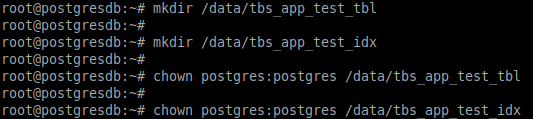
Configuration of tablespace directories on the database server.
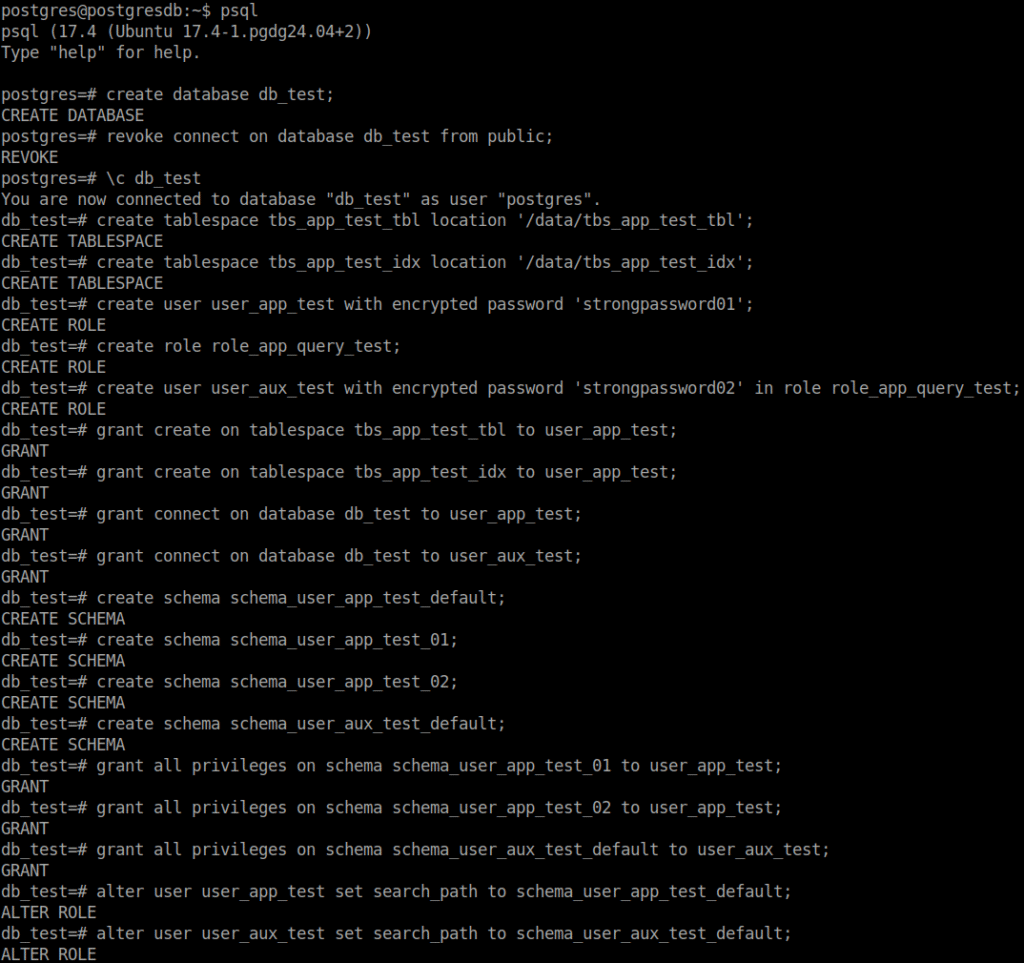
Configuration of the database, tablespaces, schemas, users/roles, and privileges.
Examples of object creation and movement
Three general cases will be covered:
- 01 – Creation of objects with an owner, schema, and tablespace different from the required ones, using a user other than the object owner.
- 02 – Creation of objects specifying the required owner, schema, and tablespace, using a user other than the object owner.
- 03 – Creation of objects specifying the required schema and tablespace, using the object owner.
Creating objects with an owner, schema, and tablespace different from the required ones, using a user other than the object owner.
In the database (db_test), table and index objects were created to demonstrate their properties regarding owner, schema, and tablespace, that is, who owns the object and what are its logical and physical organizations, respectively.
create table table_proc_01 (id serial,
                            name varchar(30),
                            data text);

create index idx_table_proc_01_col_id on table_proc_01(id);

grant select on table_proc_01 to role_app_query_test;

select *
from information_schema.table_privileges
where table_name = 'table_proc_01';

select current_database()
      ,pg_get_userbyid(pc.relowner) as table_owner
	,psat.relname as table_name
	,psat.schemaname as table_schema
	,case when pc.reltablespace = 0 then (select pt.spcname from pg_database pd join pg_tablespace pt on pd.dattablespace = pt.oid where pd.datname = (select current_database()))::name
	                                else (select pt.spcname from pg_tablespace pt where pt.oid = pc.reltablespace)::name end as table_tablespace
from pg_class pc
join pg_stat_all_tables psat on psat.relid = pc.oid
where psat.schemaname not in ('pg_toast','pg_catalog','information_schema')
order by table_owner,
	  table_name;

select current_database(), session_user, current_user, current_schema;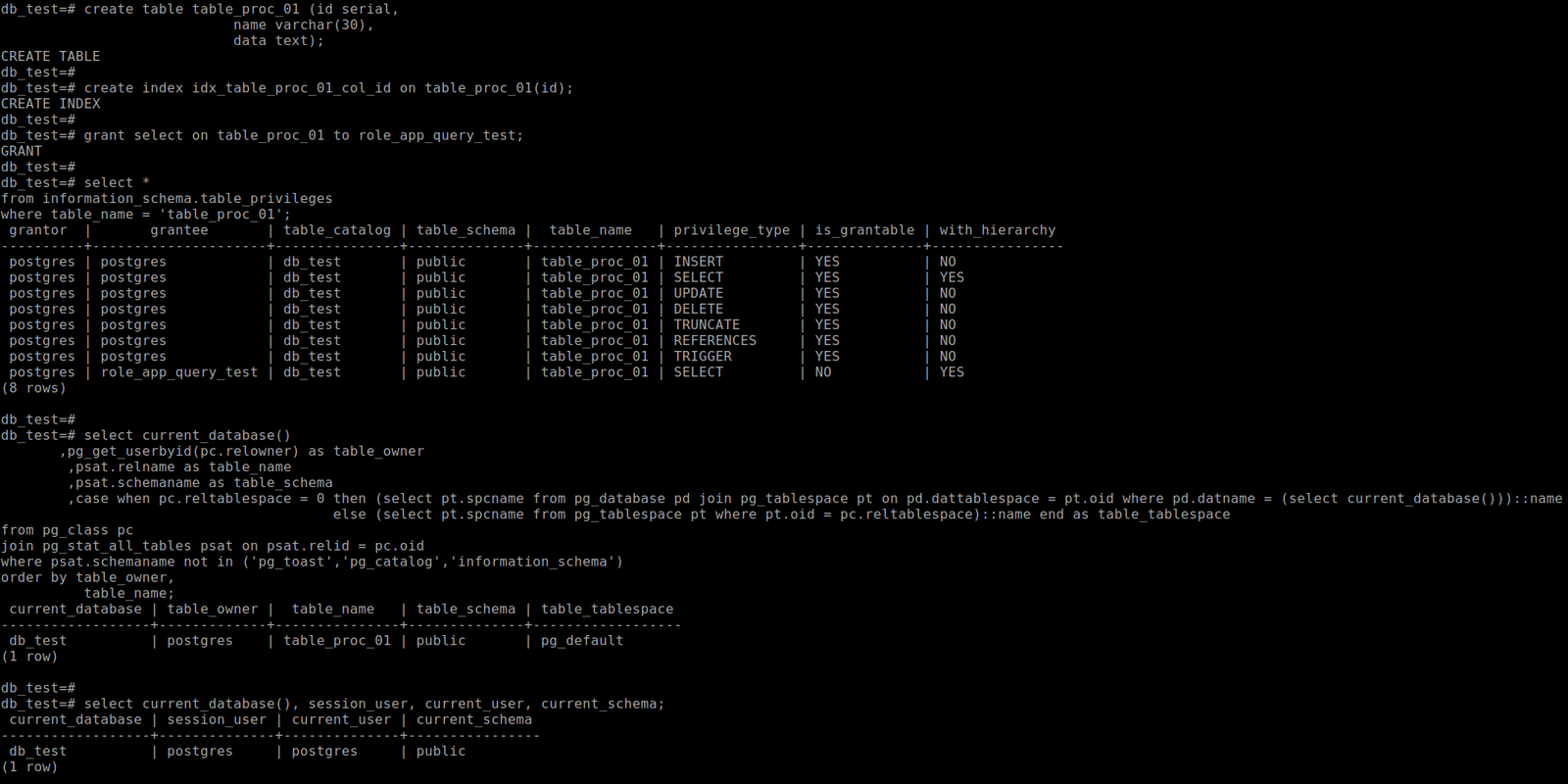
In the example above, the objects were created using the postgres superuser. It can be observed that the table’s owner (table_owner) was, by default, assumed as the postgres user (current_user), the schema was public (current_schema), and the tablespace was pg_default (table_tablespace). To properly organize the objects in the database, the table’s definitions can be modified.
Changing the table’s owner and schema
The table can be assigned a different owner and organized into a different schema, as shown in the example below.
alter table table_proc_01 owner to user_app_test;

alter table public.table_proc_01 set schema schema_user_app_test_01;

select *
from information_schema.table_privileges
where table_name = 'table_proc_01';

select current_database()
      ,pg_get_userbyid(pc.relowner) as table_owner
	,psat.relname as table_name
	,psat.schemaname as table_schema
	,case when pc.reltablespace = 0 then (select pt.spcname from pg_database pd join pg_tablespace pt on pd.dattablespace = pt.oid where pd.datname = (select current_database()))::name
	                                else (select pt.spcname from pg_tablespace pt where pt.oid = pc.reltablespace)::name end as table_tablespace
from pg_class pc
join pg_stat_all_tables psat on psat.relid = pc.oid
where psat.schemaname not in ('pg_toast','pg_catalog','information_schema')
order by table_owner,
	  table_name;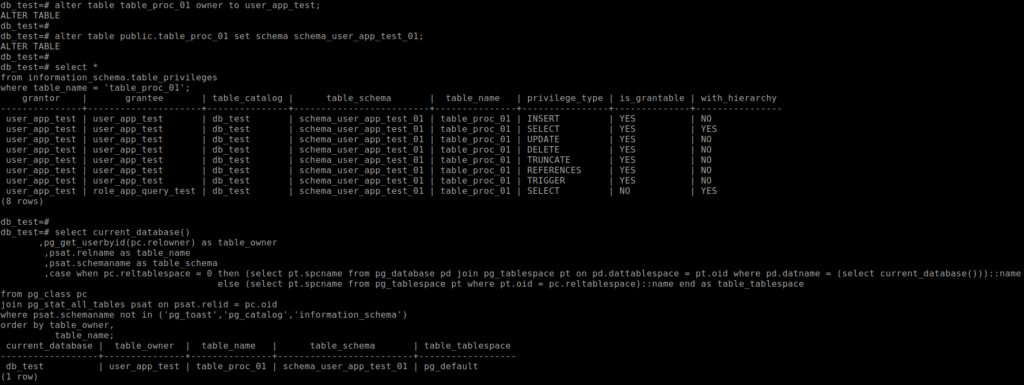
In the example above, the table that had postgres as its owner was transferred to user_app_test, and its schema was changed from public to schema_user_app_test_01. It can also be observed that the privileges were updated, and the grantor, which was previously postgres, became user_app_test.
Changing the table’s tablespace
The table can be allocated to a different tablespace. Generally speaking, there is no strict need or significant benefit in creating tablespaces to store objects outside the default tablespace and thus organize them physically; such a need may arise based on performance analyses. Here, the possibility of changing the tablespace will be demonstrated, noting that a lock is applied to the table, causing it to be unavailable for a certain period, which varies depending on the table’s size.
Note: Moving a table between tablespaces generates locks, which can negatively impact its availability. When this needs to be done, attention should be paid to the timing of the operation and the method used for the move, whether it will be performed using PostgreSQL’s native/basic approach or with an extension to assist in the process.
do $$
begin
	for i in 1..1000000 loop
		insert into schema_user_app_test_01.table_proc_01 (name, data)
		values ('name', 'data');
	end loop;
end $$;

alter table schema_user_app_test_01.table_proc_01 set tablespace tbs_app_test_tbl;

----- Em uma segunda sessão, paralela a alteração da tablespace na primeira sessão, executar os comandos abaixo.
\x on

select pd.datname
      ,pg_get_userbyid(pc.relowner) owner
      ,pc.relname
      ,psa.usename
      ,psa.pid
      ,psa.query
      ,psa.query_start
      ,round(extract(epoch from (now() - psa.state_change)),2) as elapsed_time_sec
      ,psa.state
      ,case when pl.granted = 'True' then 'helds lock'
                                     else 'lock awaited' end as granted
      ,pl.locktype
      ,mode
from pg_locks pl
join pg_class pc on pl.relation = pc.oid
join pg_stat_activity psa on pl.pid = psa.pid
join pg_database pd on pl.database = pd.oid
where relname = 'table_proc_01';
----- Em uma segunda sessão, paralela a alteração da tablespace na primeira sessão, observar o output dos comandos acima.

select current_database()
       ,pg_get_userbyid(pc.relowner) as table_owner
	,psat.relname as table_name
	,psat.schemaname as table_schema
	,case when pc.reltablespace = 0 then (select pt.spcname from pg_database pd join pg_tablespace pt on pd.dattablespace = pt.oid where pd.datname = (select current_database()))::name
	                                else (select pt.spcname from pg_tablespace pt where pt.oid = pc.reltablespace)::name end as table_tablespace
from pg_class pc
join pg_stat_all_tables psat on psat.relid = pc.oid
where psat.schemaname not in ('pg_toast','pg_catalog','information_schema')
order by table_owner,
	  table_name;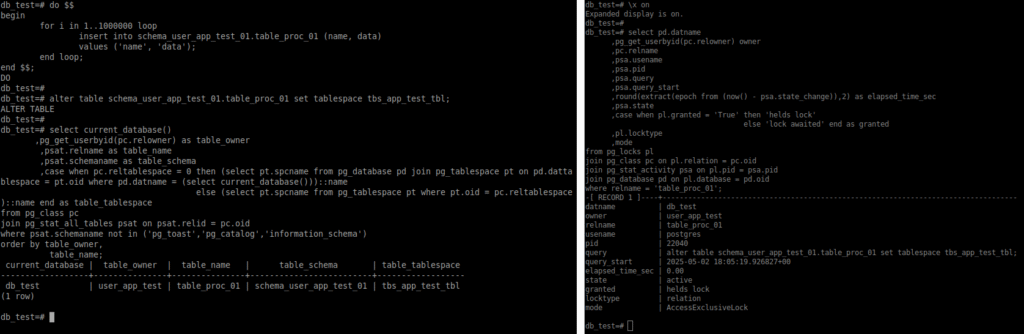
In the example above, before the move, records were added to the test table. During the table’s movement between tablespaces, in a second session connected to the db_test database, the lock (AccessExclusiveLock) generated on the table was checked.
Changing the index’s tablespace
The possibility of changing the tablespace will also be demonstrated here, noting that a lock is applied to the index, causing it to be unavailable for a certain period, which varies depending on its size. It is observed that even after changing the tablespace of the table associated with the index, the index remains allocated in its original tablespace.
Note: Moving an index between tablespaces generates locks, which can negatively impact its availability. When this needs to be done, attention should be paid to the timing of the operation and the method used, whether it will be performed using PostgreSQL’s native/basic approach or with an extension to assist in the process.
select schemaname
      ,tablename
      ,indexname
      ,case when pi.tablespace is null then (select pt.spcname from pg_database pd join pg_tablespace pt on pd.dattablespace = pt.oid where pd.datname = (select current_database()))::name
            else pi.tablespace end as table_tablespace
from pg_indexes pi
where tablename = 'table_proc_01'
order by schemaname
        ,tablename
        ,indexname;

alter index schema_user_app_test_01.idx_table_proc_01_col_id set tablespace tbs_app_test_idx;

select pd.datname
      ,pg_get_userbyid(pc.relowner) owner
      ,pc.relname
      ,psa.usename
      ,psa.pid
      ,psa.query
      ,psa.query_start
      ,round(extract(epoch from (now() - psa.state_change)),2) as elapsed_time_sec
      ,psa.state
      ,case when pl.granted = 'True' then 'helds lock'
                                     else 'lock awaited' end as granted
      ,pl.locktype
      ,mode
from pg_locks pl
join pg_class pc on pl.relation = pc.oid
join pg_stat_activity psa on pl.pid = psa.pid
join pg_database pd on pl.database = pd.oid
where relname = 'idx_table_proc_01_col_id';

select schemaname
      ,tablename
      ,indexname
      ,case when pi.tablespace is null then (select pt.spcname from pg_database pd join pg_tablespace pt on pd.dattablespace = pt.oid where pd.datname = (select current_database()))::name
            else pi.tablespace end as table_tablespace
from pg_indexes pi
--where tablename = 'table_proc_01'
order by schemaname
        ,tablename
        ,indexname;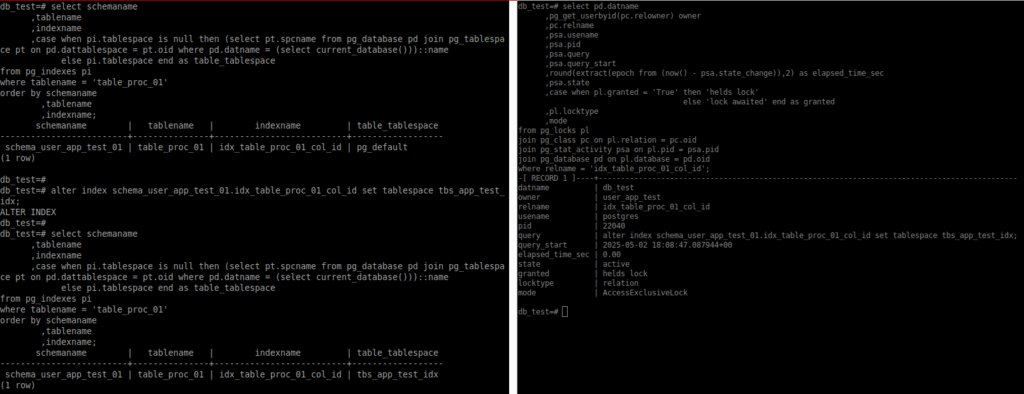
During the movement of the index between tablespaces, in a second session connected to the db_test database, the lock (AccessExclusiveLock) generated on the table was checked.
Creating objects specifying owner, schema, and tablespace, using a user other than the object owner
When connected to the database with a user different from the one who should own the objects, the role can be set (SET ROLE) so that the object is created under the appropriate owner. In this case, the connection is being made using the postgres superuser. In the CREATE command example below, the schema and tablespace are explicitly specified. After the object is created, the role is reset and returns to its default value.
set role 'user_app_test';

select current_database(), session_user, current_user, current_schema;

create table schema_user_app_test_02.table_proc_02 (id serial,
                                                    name varchar(30),
                                                    data text) tablespace tbs_app_test_tbl;

reset role;

select current_database(), session_user, current_user, current_schema;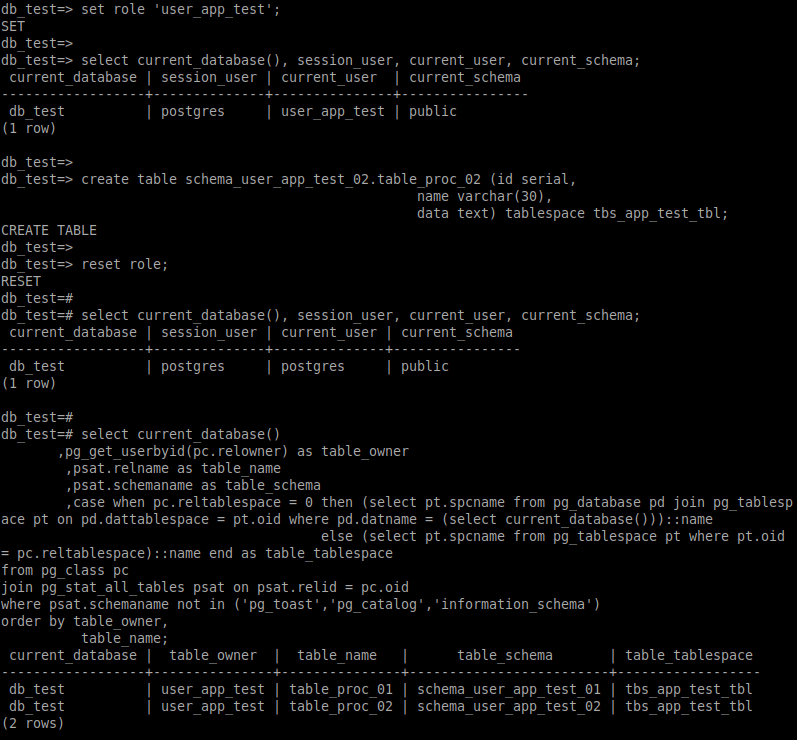
Creating objects specifying schema and tablespace, using the object owner
In the example below, a connection was made to the db_test database using the user (user_app_test) who will be the owner of the objects. The objects will have the desired owner, and the schema and tablespace are specified in the CREATE commands.
psql -h localhost -p 5432 -U user_app_test -d db_test

select current_database(), session_user, current_user, current_schema;

create table schema_user_app_test_01.table_aux_01 (id serial,
                   name varchar(30),
                   data text) tablespace tbs_app_test_tbl;

create index idx_table_aux_01_col_id on schema_user_app_test_01.table_aux_01(id) tablespace tbs_app_test_idx;

create table schema_user_app_test_02.table_aux_02 (id serial,
                   name varchar(30),
                   data text) tablespace tbs_app_test_tbl;

select current_database(),
       pg_get_userbyid(pc.relowner) as table_owner,
	psat.relname as table_name,
	psat.schemaname as table_schema,
	case when pc.reltablespace = 0 then (select pt.spcname from pg_database pd join pg_tablespace pt on pd.dattablespace = pt.oid where pd.datname = (select current_database()))::name
	                                else (select pt.spcname from pg_tablespace pt where pt.oid = pc.reltablespace)::name end as table_tablespace
from pg_class pc
join pg_stat_all_tables psat on psat.relid = pc.oid
where psat.schemaname not in ('pg_toast','pg_catalog','information_schema')
--psat.relname in ('table_name')
order by table_owner,
	  table_name;

select schemaname
      ,tablename
      ,indexname
      ,case when pi.tablespace is null then (select pt.spcname from pg_database pd join pg_tablespace pt on pd.dattablespace = pt.oid where pd.datname = (select current_database()))::name
            else pi.tablespace end as table_tablespace
from pg_indexes pi
where schemaname in ('schema_user_app_test_01')
order by schemaname
        ,tablename
        ,indexname;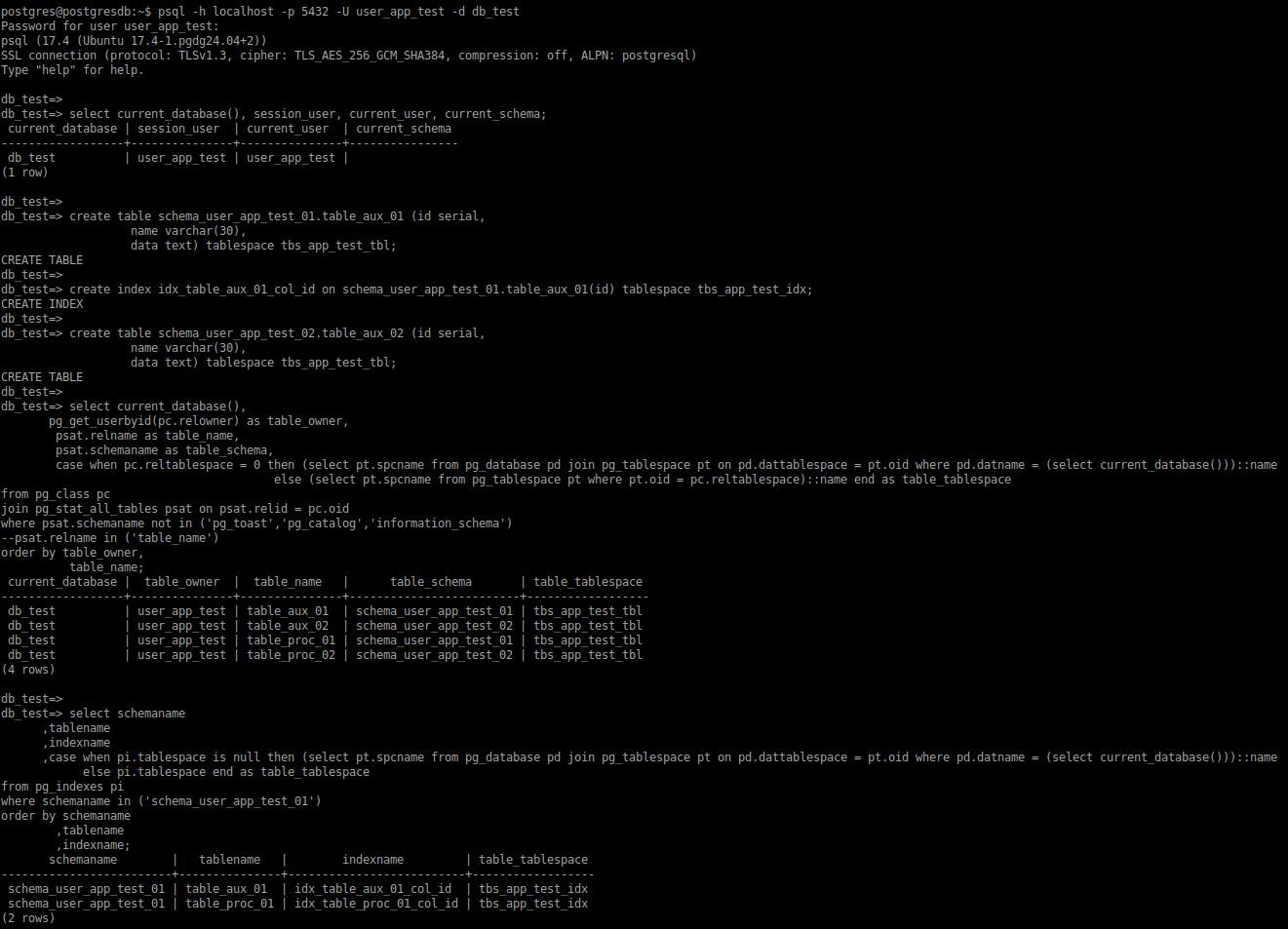
Considerations
Ensuring proper organization of the database is very important. Therefore, make sure that new resources have the correct definitions and that existing ones are properly configured. When making changes to objects, keep in mind that they may become temporarily unavailable, which can negatively impact others (applications, users, routines, etc.).