
Introduction
Databases use different types of objects (relations) to store data on disk. Even within the same type of object, data can be stored, accessed, or referenced in different ways depending on various factors, such as the data type, data size, type of operation (insert, update, delete), estimated execution cost, TOAST techniques, HOT optimization, and others. It’s also important to note that data may reside in memory without necessarily being persisted to disk.
A common object for storing persistent data is the regular (ordinary) table, which is why it has been selected for closer examination in the demonstrations. An ordinary table will be created and populated to illustrate key concepts of database architecture. While these operations do not represent every mechanism involved in storing, managing, or accessing data, they cover typical and widely encountered scenarios.
In addition to basic DDL and DML commands, disk files will be accessed either directly through Bash commands or indirectly via database extension functions to support the demonstrations. The objective is to inspect the contents of these files; however, direct interaction with disk files should be avoided unless absolutely necessary. For investigative purposes, accessing data through extension functions is generally preferred. Overall, the commands used are relatively simple, but if you plan to reproduce these steps, it is recommended to do so in a test environment to avoid impacting production or critical systems.
Demonstrations
The demonstrations on the next sections will work around two simple regular tables table01 and table02and table02, and most of the examples will be related to the first one.

The postgresql cluster environment and the psql client used in the demonstrations are version 18, running on Ubuntu 24.04.3 LTS.
P.S: Keep in mind that some definitions can change across different releases/versions of PostgreSQL.
postgres@pg01:~$ pg_lsclusters
Ver Cluster Port Status Owner    Data directory              Log file
18  main    5432 online postgres /var/lib/postgresql/18/main /var/log/postgresql/postgresql-18-main.log
postgres@pg01:~$
postgres@pg01:~$ psql --version
psql (PostgreSQL) 18.1 (Ubuntu 18.1-1.pgdg24.04+2)
postgres@pg01:~$
postgres@pg01:~$ cat /etc/os-release | head -7
PRETTY_NAME="Ubuntu 24.04.3 LTS"
NAME="Ubuntu"
VERSION_ID="24.04"
VERSION="24.04.3 LTS (Noble Numbat)"
VERSION_CODENAME=noble
ID=ubuntu
ID_LIKE=debianGeneral setup (database, tablespace, schema, user, privileges)
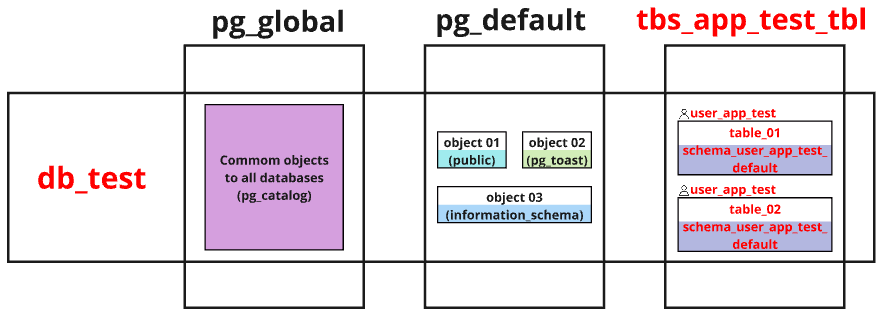
To simulate the environment, a database (db_test) and additional resources will be created. A database user (user_app_test) will own the tables (table_01 and table02). These tables will be logically organized within a schema (schema_user_app_test_default) and physically stored in a tablespace (tbs_app_test_tbl). Additional privileges are required to create and access the data. The image below illustrates these resources, followed by the commands used to create them.
The code block below contains the commands for setting up the general environment.
root@pg01:~# sudo mkdir -p /data/tbs_app_test_tbl
root@pg01:~#
root@pg01:~# sudo chown -R postgres:postgres /data
root@pg01:~#
root@pg01:~# sudo su - postgres
postgres@pg01:~$
postgres@pg01:~$ psql
psql (18.1 (Ubuntu 18.1-1.pgdg24.04+2))
Type "help" for help.

postgres=#
postgres=# create database db_test;
CREATE DATABASE
postgres=#
postgres=# \c db_test
You are now connected to database "db_test" as user "postgres".
db_test=#
db_test=# create tablespace tbs_app_test_tbl location '/data/tbs_app_test_tbl';
CREATE TABLESPACE
db_test=#
db_test=# create user user_app_test with encrypted password 'strongpassword01';
CREATE ROLE
db_test=#
db_test=# grant create on tablespace tbs_app_test_tbl to user_app_test;
GRANT
db_test=#
db_test=# create schema schema_user_app_test_default;
CREATE SCHEMA
db_test=#
db_test=# grant all privileges on schema schema_user_app_test_default to user_app_test;
GRANT
db_test=#
db_test=# alter user user_app_test set search_path to schema_user_app_test_default;
ALTER ROLECreating and inspecting an empty table
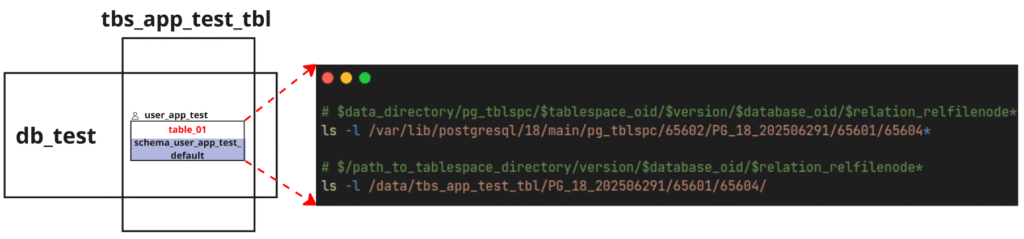
The table is created with user_app_test as its owner, within the schema schema_user_app_test_default, and is physically stored in the tablespace tbs_app_test_tbl. After a table is created, its location can also be verified using system catalog queries or built-in functions.
The files associated with the table can be found on disk within the tablespace directory pg_tblspc, following the path <data_directory>/pg_tblspc/<tablespace_oid>/<version>/<database_oid>/<relation_relfilenode>*. If the tablespace is defined in a custom directory, then the path <data_directory>/pg_tblspc/<tablespace_oid> will be a symbolic link pointing to the actual tablespace location </path_to_tablespace_directory>/<version>/<database_oid>/<relation_relfilenode>*.
The image below summarizes the table’s logical organization and the physical location of its files on disk. The code block that follows contains commands to retrieve table information.
The code block below includes the commands used to create and inspect the table.
postgres@pg01:~$ psql -d db_test
psql (18.1 (Ubuntu 18.1-1.pgdg24.04+2))
Type "help" for help.

db_test=# set role 'user_app_test';
SET
db_test=>
db_test=> create table schema_user_app_test_default.table_01 (id integer,
                                                    name varchar(30),
                                                    data text) tablespace tbs_app_test_tbl;
CREATE TABLE
db_test=>
db_test=> select oid, relowner, relnamespace, relname, reltablespace, relfilenode from pg_class where relname = 'table_01';
  oid  | relowner | relnamespace | relname  | reltablespace | relfilenode
-------+----------+--------------+----------+---------------+-------------
 65604 |    40964 |        65603 | table_01 |         65602 |       65604
(1 row)

db_test=>
db_test=> select oid, nspname from pg_namespace where nspname = 'schema_user_app_test_default';
  oid  |           nspname
-------+------------------------------
 65603 | schema_user_app_test_default
(1 row)

db_test=>
db_test=> select oid, spcname from pg_tablespace where spcname = 'tbs_app_test_tbl';
  oid  |     spcname
-------+------------------
 65602 | tbs_app_test_tbl
(1 row)

db_test=>
db_test=> select oid, datname from pg_database where datname = 'db_test';
  oid  | datname
-------+---------
 65601 | db_test
(1 row)

db_test=>
db_test=> select pg_relation_filenode('schema_user_app_test_default.table_01');
 pg_relation_filenode
----------------------
                65604
(1 row)

db_test=>
db_test=> select pg_relation_filepath('schema_user_app_test_default.table_01');
            pg_relation_filepath
---------------------------------------------
 pg_tblspc/65602/PG_18_202506291/65601/65604
(1 row)

db_test=>
db_test=> select pg_tablespace_location(65602);
 pg_tablespace_location
------------------------
 /data/tbs_app_test_tbl
(1 row)

db_test=>
db_test=> exit
postgres@pg01:~$
postgres@pg01:~$ ls -l /var/lib/postgresql/18/main/pg_tblspc/
total 0
lrwxrwxrwx 1 postgres postgres 22 Jan 28 15:03 65602 -> /data/tbs_app_test_tbl
postgres@pg01:~$
postgres@pg01:~$ ls -l /var/lib/postgresql/18/main/pg_tblspc/65602/PG_18_202506291/65601/
total 8
-rw------- 1 postgres postgres    0 Jan 28 15:05 65604
-rw------- 1 postgres postgres    0 Jan 28 15:05 65607
-rw------- 1 postgres postgres 8192 Jan 28 15:05 65608
postgres@pg01:~$
postgres@pg01:~$ ls -l /data/tbs_app_test_tbl
total 4
drwx------ 3 postgres postgres 4096 Jan 28 15:05 PG_18_202506291
postgres@pg01:~$
postgres@pg01:~$ ls -l /data/tbs_app_test_tbl/PG_18_202506291/65601/
total 8
-rw------- 1 postgres postgres    0 Jan 28 15:05 65604
-rw------- 1 postgres postgres    0 Jan 28 15:05 65607
-rw------- 1 postgres postgres 8192 Jan 28 15:05 65608Inserting a row into the table and locating the data
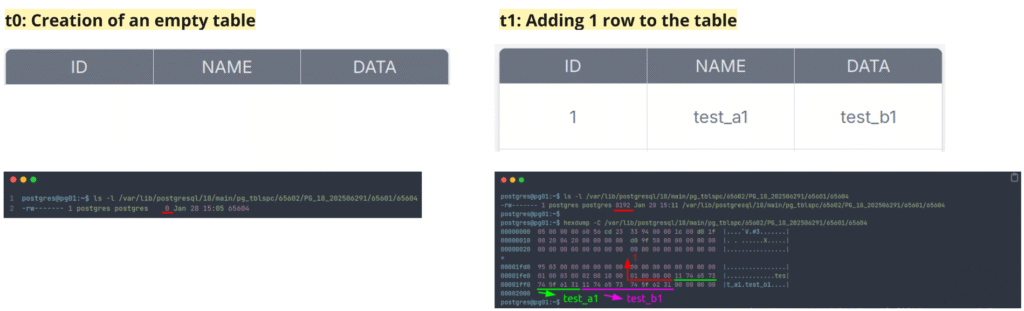
After the table was created, it remained empty, and its associated file on disk was also empty (0 bytes). Once a record was inserted, the file became populated with data, growing from 0 bytes to 8,192 bytes. The inserted data can be found within the table’s underlying relation file on disk. It is worth noting that a table is internally organized as an array of pages. By default, each page is 8 KB in size, which corresponds to the block_size value of 8,192 bytes.
The code block below contains the commands used to insert the row and locate the data.
postgres@pg01:~$ psql -d db_test
psql (18.1 (Ubuntu 18.1-1.pgdg24.04+2))
Type "help" for help.

db_test=# begin;
BEGIN
db_test=*#
db_test=*# insert into schema_user_app_test_default.table_01 (id, name, data) values (1,'test_a1','test_b1');
INSERT 0 1
db_test=*#
db_test=*# commit;
COMMIT
db_test=#
db_test=# select current_setting('block_size');
 current_setting
-----------------
 8192
(1 row)

db_test=#
db_test=# exit
postgres@pg01:~$
postgres@pg01:~$ ls -l /var/lib/postgresql/18/main/pg_tblspc/65602/PG_18_202506291/65601/65604
-rw------- 1 postgres postgres 8192 Jan 28 15:11 /var/lib/postgresql/18/main/pg_tblspc/65602/PG_18_202506291/65601/65604
postgres@pg01:~$
postgres@pg01:~$ hexdump -C /var/lib/postgresql/18/main/pg_tblspc/65602/PG_18_202506291/65601/65604
00000000  05 00 00 00 60 56 cd 23  33 94 00 00 1c 00 d0 1f  |....`V.#3.......|
00000010  00 20 04 20 00 00 00 00  d0 9f 58 00 00 00 00 00  |. . ......X.....|
00000020  00 00 00 00 00 00 00 00  00 00 00 00 00 00 00 00  |................|
*
00001fd0  95 03 00 00 00 00 00 00  00 00 00 00 00 00 00 00  |................|
00001fe0  01 00 03 00 02 08 18 00  01 00 00 00 11 74 65 73  |.............tes|
00001ff0  74 5f 61 31 11 74 65 73  74 5f 62 31 00 00 00 00  |t_a1.test_b1....|
00002000
postgres@pg01:~$
postgres@pg01:~$ echo -n "01 00 00 00" | xxd -r -p | xxd -b | awk '{ for (i=2; i<=NF; i++) { if ($i ~ /^[01]{8}$/) printf "%s ", $i } print ""}' | tr -d ' ' | fold -w8 | tac | tr -d '\n' | cut -c1-32 | xargs -I{} bash -c 'echo $((2#{}))'
1
postgres@pg01:~$
postgres@pg01:~$ echo "11 74 65 73 74 5f 61 31" | xxd -r -p | strings
test_a1
postgres@pg01:~$ echo "11 74 65 73 74 5f 62 31" | xxd -r -p | strings
test_b1Now that the general concept of data creation and storage has been introduced, we can explore in more detail how data is physically organized and located within disk files. The following sections will cover these aspects.
Table page structure
The overall page layout for a table consists of five parts, as shown in the images below. Once the table is "initialized" with data, its relation file on disk is filled with pages that have a structure. The first element is thepage header datawhich contains general information about the page. In the page layout, after the page header comes the identificador de item/ItemId, also known as ItemIdData. In the "middle" of the structure is the “free space”, or unallocated space, which is reserved for internal use to store item identifiers and items. At the end are theitem, which are the data, followed by the “special“, which is reserved for access methods but is empty for ordinary tables.
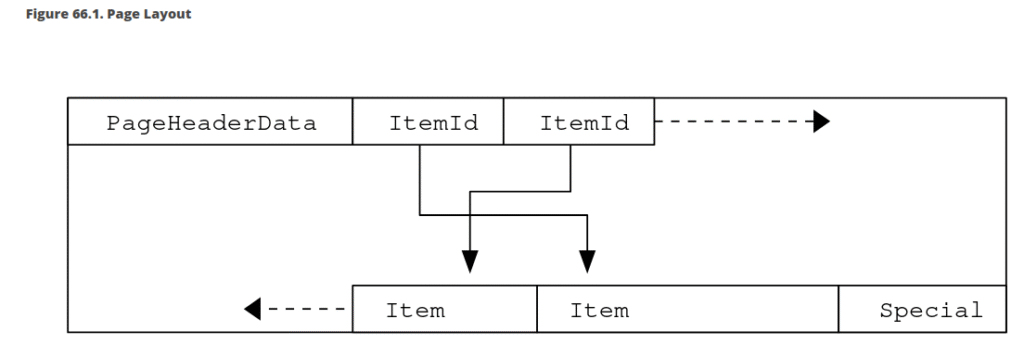
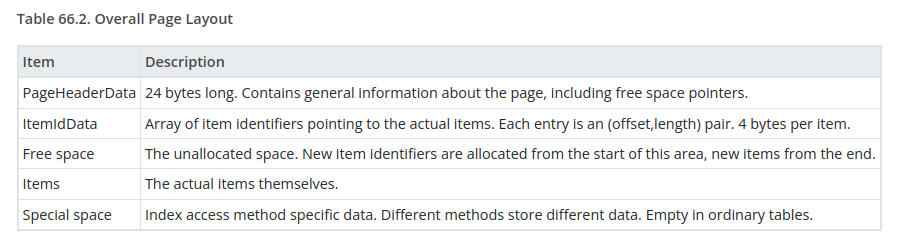
In the next sections, the table page structure will be shown using the previous table example.
Table page header data layout
The page header data contains information about the page, and its layout is shown in the image below. As described in the PostgreSQL documentation, the page version is considered as follows: "Beginning with PostgreSQL 8.3 the version number is 4; PostgreSQL 8.1 and 8.2 used version number 3; PostgreSQL 8.0 used version number 2; PostgreSQL 7.3 and 7.4 used version number 1; prior releases used version number 0."
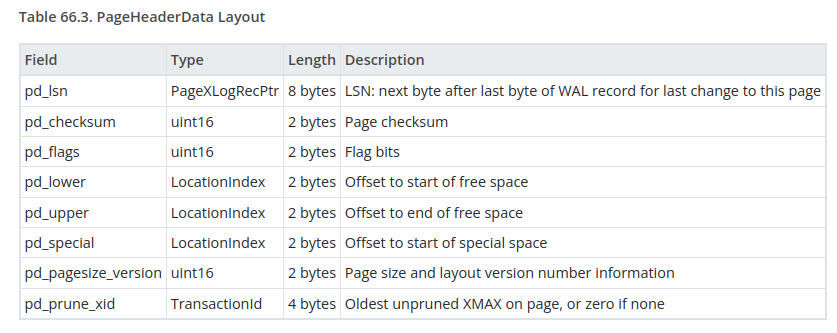
For table01, after inspecting its relation file on disk, the page header data can be interpreted.
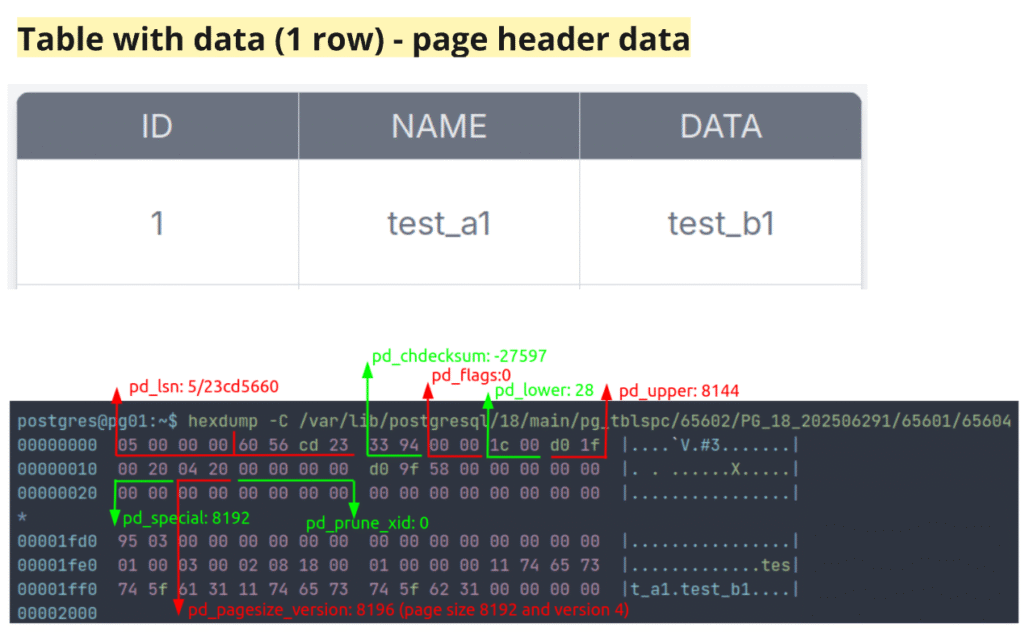
The transformations of hexadecimal data to interpret the page header are shown in the code below.
P.S.: These transformations could be performed in a faster and more efficient way, but they were kept like this to remain intuitive.
postgres@pg01:~$ hexdump -C /var/lib/postgresql/18/main/pg_tblspc/65602/PG_18_202506291/65601/65604
00000000  05 00 00 00 60 56 cd 23  33 94 00 00 1c 00 d0 1f  |....`V.#3.......|
00000010  00 20 04 20 00 00 00 00  d0 9f 58 00 00 00 00 00  |. . ......X.....|
00000020  00 00 00 00 00 00 00 00  00 00 00 00 00 00 00 00  |................|
*
00001fd0  95 03 00 00 00 00 00 00  00 00 00 00 00 00 00 00  |................|
00001fe0  01 00 03 00 02 08 18 00  01 00 00 00 11 74 65 73  |.............tes|
00001ff0  74 5f 61 31 11 74 65 73  74 5f 62 31 00 00 00 00  |t_a1.test_b1....|
00002000
postgres@pg01:~$
postgres@pg01:~$ ## PageHeaderData
postgres@pg01:~$ # pd_lsn
postgres@pg01:~$ echo -n "05 00 00 00" | xxd -r -p | xxd -b | awk '{ for (i=2; i<=NF; i++) { if ($i ~ /^[01]{8}$/) printf "%s ", $i } print ""}' | tr -d ' ' | fold -w8 | tac | tr -d '\n' | cut -c1-32 | xargs -I{} bash -c 'echo $((2#{}))'
5
postgres@pg01:~$
postgres@pg01:~$ # pd_checksum
postgres@pg01:~$ echo -n "33 94" | xxd -r -p | xxd -b | awk '{ for (i=2; i<=NF; i++) { if ($i ~ /^[01]{8}$/) printf "%s ", $i } print ""}' | tr -d ' ' | fold -w8 | tac | tr -d '\n' | python3 -c 'import sys; b=sys.stdin.read().strip(); n=len(b); v=int(b,2); print(v-(1<<n) if b[0]=="1" else v)'
-27597
postgres@pg01:~$
postgres@pg01:~$ # pd_flags
postgres@pg01:~$ echo -n "00 00" | xxd -r -p | xxd -b | awk '{ for (i=2; i<=NF; i++) { if ($i ~ /^[01]{8}$/) printf "%s ", $i } print ""}' | tr -d ' ' | fold -w8 | tac | tr -d '\n' | cut -c1-16 | xargs -I{} bash -c 'echo $((2#{}))'
0
postgres@pg01:~$
postgres@pg01:~$ # pd_lower
postgres@pg01:~$ echo -n "1c 00" | xxd -r -p | xxd -b | awk '{ for (i=2; i<=NF; i++) { if ($i ~ /^[01]{8}$/) printf "%s ", $i } print ""}' | tr -d ' ' | fold -w8 | tac | tr -d '\n' | cut -c1-16 | xargs -I{} bash -c 'echo $((2#{}))'
28
postgres@pg01:~$
postgres@pg01:~$ # pd_upper
postgres@pg01:~$ echo -n "d0 1f" | xxd -r -p | xxd -b | awk '{ for (i=2; i<=NF; i++) { if ($i ~ /^[01]{8}$/) printf "%s ", $i } print ""}' | tr -d ' ' | fold -w8 | tac | tr -d '\n' | cut -c1-16 | xargs -I{} bash -c 'echo $((2#{}))'
8144
postgres@pg01:~$
postgres@pg01:~$ # pd_special
postgres@pg01:~$ echo -n "00 20" | xxd -r -p | xxd -b | awk '{ for (i=2; i<=NF; i++) { if ($i ~ /^[01]{8}$/) printf "%s ", $i } print ""}' | tr -d ' ' | fold -w8 | tac | tr -d '\n' | cut -c1-16 | xargs -I{} bash -c 'echo $((2#{}))'
8192
postgres@pg01:~$
postgres@pg01:~$ # pd_pagesize_version
postgres@pg01:~$ echo -n "04 20" | xxd -r -p | xxd -b | awk '{ for (i=2; i<=NF; i++) { if ($i ~ /^[01]{8}$/) printf "%s ", $i } print ""}' | tr -d ' ' | fold -w8 | tac | tr -d '\n' | cut -c1-16
0010000000000100
postgres@pg01:~$
postgres@pg01:~$ echo -n "04 20" | xxd -r -p | xxd -b | awk '{ for (i=2; i<=NF; i++) { if ($i ~ /^[01]{8}$/) printf "%s ", $i } print ""}' | tr -d ' ' | fold -w8 | tac | tr -d '\n' | cut -c1-16 | xargs -I{} bash -c 'echo $((2#{}))'
8196
postgres@pg01:~$
postgres@pg01:~$ # pd_prune_xid
postgres@pg01:~$ echo -n "00 00 00 00" | xxd -r -p | xxd -b | awk '{ for (i=2; i<=NF; i++) { if ($i ~ /^[01]{8}$/) printf "%s ", $i } print ""}' | tr -d ' ' | fold -w8 | tac | tr -d '\n' | cut -c1-32 | xargs -I{} bash -c 'echo $((2#{}))'
0Table page ItemIdData, free space, items, and special layout
The item identifier (ItemIdData) specifies the byte offset to the start of an item, the item length in bytes, and includes a few additional bits that can affect its interpretation. The item identifier is allocated as needed at the beginning of the unallocated space and is never moved until freed. Its index is used by PostgreSQL as part of an item pointer (ctid) together with the page number.ctid), junto com o número da página.
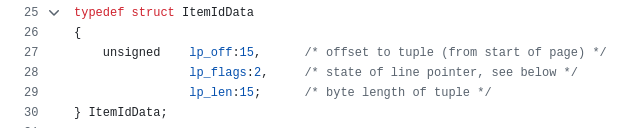
The free space is reserved for operations on the table/relation, allowing new item identifiers and items to be allocated.
Items are stored starting from the end of the unallocated space and growing backward. For tables, the item structure corresponds to the heap tuple header and the actual stored data.
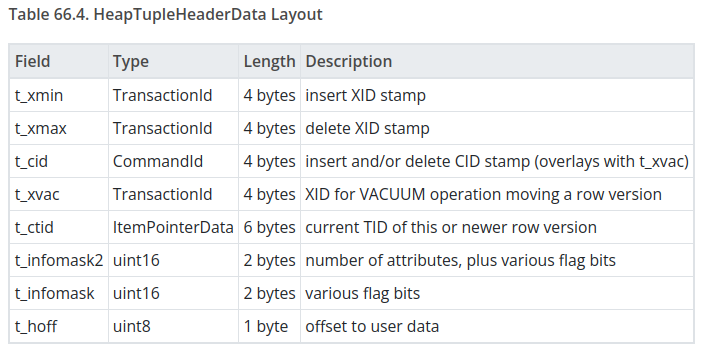
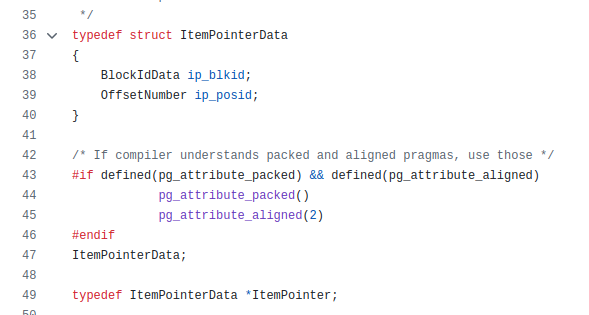
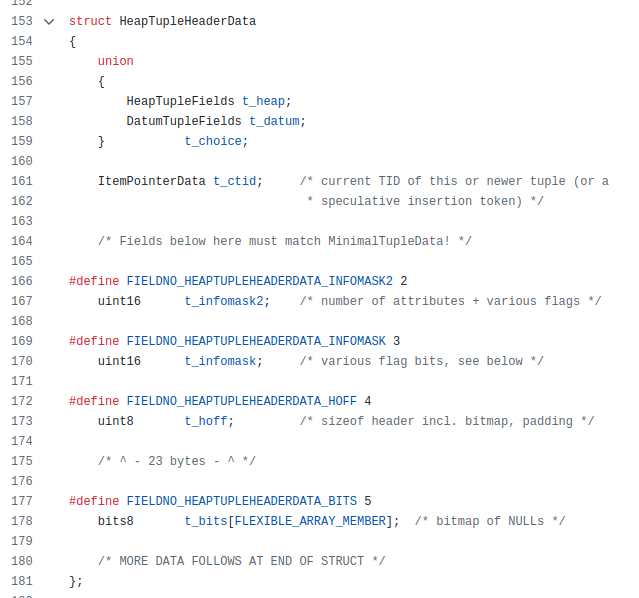
The special space is reserved for access methods, but for ordinary tables it is empty.
For table01, after inspecting its relation file on disk, the item identifiers and heap tuple header data can be interpreted. The free space is denoted by “*” in the offset column of the file data.
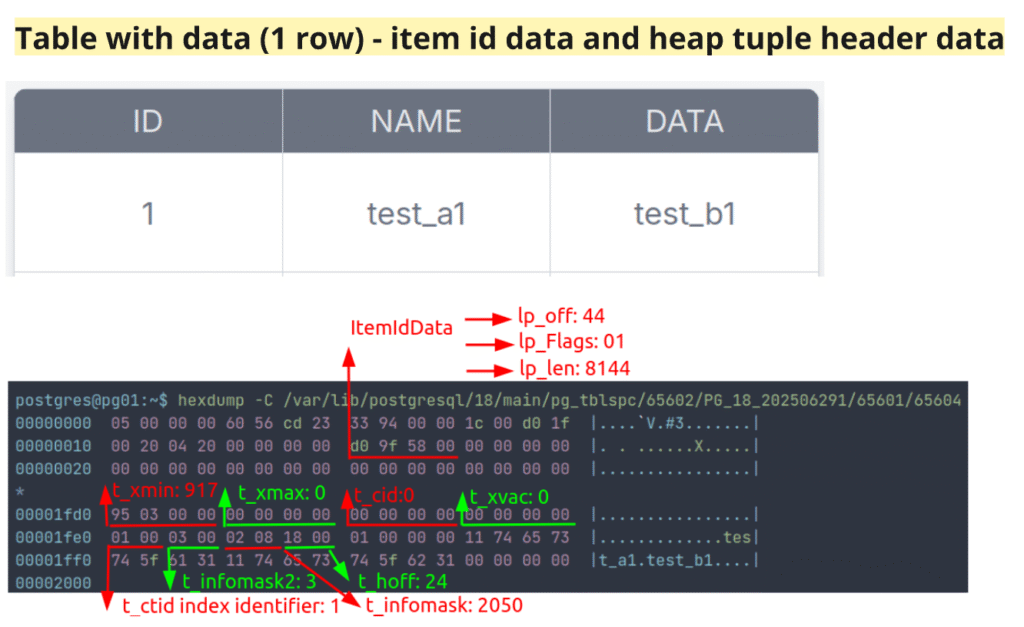
P.S.: There are other ways of inserting and updating data, such as the TOAST (oversized-attribute storage) technique and HOT (heap-only tuple update) optimization, so the previously described data locations may not apply in all cases.
The transformations of hexadecimal data used to interpret the item identifiers and heap tuple header are shown in the code below.
P.S.: Essas transformações poderiam ser realizadas de forma mais rápida e eficiente, mas foram mantidas dessa maneira para permanecerem intuitivas.
postgres@pg01:~$ hexdump -C /var/lib/postgresql/18/main/pg_tblspc/65602/PG_18_202506291/65601/65604
00000000  05 00 00 00 60 56 cd 23  33 94 00 00 1c 00 d0 1f  |....`V.#3.......|
00000010  00 20 04 20 00 00 00 00  d0 9f 58 00 00 00 00 00  |. . ......X.....|
00000020  00 00 00 00 00 00 00 00  00 00 00 00 00 00 00 00  |................|
*
00001fd0  95 03 00 00 00 00 00 00  00 00 00 00 00 00 00 00  |................|
00001fe0  01 00 03 00 02 08 18 00  01 00 00 00 11 74 65 73  |.............tes|
00001ff0  74 5f 61 31 11 74 65 73  74 5f 62 31 00 00 00 00  |t_a1.test_b1....|
00002000
postgres@pg01:~$
postgres@pg01:~$ # lp info
postgres@pg01:~$ echo -n "d0 9f 58 00" | xxd -r -p | xxd -b | awk '{ for (i=2; i<=NF; i++) { if ($i ~ /^[01]{8}$/) printf "%s ", $i } print ""}' | tr -d ' ' | fold -w8 | tac | tr -d '\n' ; echo
00000000010110001001111111010000
postgres@pg01:~$
postgres@pg01:~$ # lp_off
postgres@pg01:~$ echo -n "d0 9f 58 00" | xxd -r -p | xxd -b | awk '{ for (i=2; i<=NF; i++) { if ($i ~ /^[01]{8}$/) printf "%s ", $i } print ""}' | tr -d ' ' | fold -w8 | tac | tr -d '\n' | cut -c1-15
000000000101100
postgres@pg01:~$
postgres@pg01:~$ echo -n "d0 9f 58 00" | xxd -r -p | xxd -b | awk '{ for (i=2; i<=NF; i++) { if ($i ~ /^[01]{8}$/) printf "%s ", $i } print ""}' | tr -d ' ' | fold -w8 | tac | tr -d '\n' | cut -c1-15 | xargs -I{} bash -c 'echo $((2#{}))'
44
postgres@pg01:~$
postgres@pg01:~$ # lp_flags
postgres@pg01:~$ echo -n "d0 9f 58 00" | xxd -r -p | xxd -b | awk '{ for (i=2; i<=NF; i++) { if ($i ~ /^[01]{8}$/) printf "%s ", $i } print ""}' | tr -d ' ' | fold -w8 | tac | tr -d '\n' | cut -c16-17
01
postgres@pg01:~$
postgres@pg01:~$ echo -n "d0 9f 58 00" | xxd -r -p | xxd -b | awk '{ for (i=2; i<=NF; i++) { if ($i ~ /^[01]{8}$/) printf "%s ", $i } print ""}' | tr -d ' ' | fold -w8 | tac | tr -d '\n' | cut -c16-17 | xargs -I{} bash -c 'echo $((2#{}))'
1
postgres@pg01:~$
postgres@pg01:~$ # lp_len
postgres@pg01:~$ echo -n "d0 9f 58 00" | xxd -r -p | xxd -b | awk '{ for (i=2; i<=NF; i++) { if ($i ~ /^[01]{8}$/) printf "%s ", $i } print ""}' | tr -d ' ' | fold -w8 | tac | tr -d '\n' | cut -c18-32
001111111010000
postgres@pg01:~$
postgres@pg01:~$ echo -n "d0 9f 58 00" | xxd -r -p | xxd -b | awk '{ for (i=2; i<=NF; i++) { if ($i ~ /^[01]{8}$/) printf "%s ", $i } print ""}' | tr -d ' ' | fold -w8 | tac | tr -d '\n' | cut -c18-32 | xargs -I{} bash -c 'echo $((2#{}))'
8144
postgres@pg01:~$
postgres@pg01:~$ ## heap tuple header
postgres@pg01:~$ # t_xmin
postgres@pg01:~$ echo -n "95 03 00 00" | xxd -r -p | xxd -b | awk '{ for (i=2; i<=NF; i++) { if ($i ~ /^[01]{8}$/) printf "%s ", $i } print ""}' | tr -d ' ' | fold -w8 | tac | tr -d '\n' | cut -c1-32 | xargs -I{} bash -c 'echo $((2#{}))'
917
postgres@pg01:~$
postgres@pg01:~$ # t_xmax
postgres@pg01:~$ echo -n "00 00 00 00" | xxd -r -p | xxd -b | awk '{ for (i=2; i<=NF; i++) { if ($i ~ /^[01]{8}$/) printf "%s ", $i } print ""}' | tr -d ' ' | fold -w8 | tac | tr -d '\n' | cut -c1-32 | xargs -I{} bash -c 'echo $((2#{}))'
0
postgres@pg01:~$
postgres@pg01:~$ # t_cid
postgres@pg01:~$ echo -n "00 00 00 00" | xxd -r -p | xxd -b | awk '{ for (i=2; i<=NF; i++) { if ($i ~ /^[01]{8}$/) printf "%s ", $i } print ""}' | tr -d ' ' | fold -w8 | tac | tr -d '\n' | cut -c1-32 | xargs -I{} bash -c 'echo $((2#{}))'
0
postgres@pg01:~$
postgres@pg01:~$ # t_xvac
postgres@pg01:~$ echo -n "00 00 00 00" | xxd -r -p | xxd -b | awk '{ for (i=2; i<=NF; i++) { if ($i ~ /^[01]{8}$/) printf "%s ", $i } print ""}' | tr -d ' ' | fold -w8 | tac | tr -d '\n' | cut -c1-32 | xargs -I{} bash -c 'echo $((2#{}))'
0
postgres@pg01:~$
postgres@pg01:~$ # t_ctid index identifier
postgres@pg01:~$ echo -n "01 00" | xxd -r -p | xxd -b | awk '{ for (i=2; i<=NF; i++) { if ($i ~ /^[01]{8}$/) printf "%s ", $i } print ""}' | tr -d ' ' | fold -w8 | tac | tr -d '\n' | cut -c1-16 | xargs -I{} bash -c 'echo $((2#{}))'
1
postgres@pg01:~$
postgres@pg01:~$ # t_infomask2
postgres@pg01:~$ echo -n "03 00" | xxd -r -p | xxd -b | awk '{ for (i=2; i<=NF; i++) { if ($i ~ /^[01]{8}$/) printf "%s ", $i } print ""}' | tr -d ' ' | fold -w8 | tac | tr -d '\n' | cut -c1-16 | xargs -I{} bash -c 'echo $((2#{}))'
3
postgres@pg01:~$
postgres@pg01:~$ # t_infomask
postgres@pg01:~$ echo -n "02 08" | xxd -r -p | xxd -b | awk '{ for (i=2; i<=NF; i++) { if ($i ~ /^[01]{8}$/) printf "%s ", $i } print ""}' | tr -d ' ' | fold -w8 | tac | tr -d '\n' | cut -c1-16 | xargs -I{} bash -c 'echo $((2#{}))'
2050
postgres@pg01:~$
postgres@pg01:~$ # t_hoff
postgres@pg01:~$ echo -n "18" | xxd -r -p | xxd -b | awk '{ for (i=2; i<=NF; i++) { if ($i ~ /^[01]{8}$/) printf "%s ", $i } print ""}' | tr -d ' ' | fold -w8 | tac | tr -d '\n' | cut -c1-8 | xargs -I{} bash -c 'echo $((2#{}))'
24Viewing table page structure with the pageinspect extension
Instead of manually inspecting the table’s relation file on disk, this can be done directly in the database using functions from the pageinspect extension. Both the page header and heap page items can be examined at the block level. In the examples below, block number 0 (the first block of the relation) was inspected.
postgres@pg01:~$ psql -d db_test
psql (18.1 (Ubuntu 18.1-1.pgdg24.04+2))
Type "help" for help.

db_test=# create extension if not exists pageinspect;
CREATE EXTENSION
db_test=#
db_test=# select * from page_header(get_raw_page('schema_user_app_test_default.table_01',0));
    lsn     | checksum | flags | lower | upper | special | pagesize | version | prune_xid
------------+----------+-------+-------+-------+---------+----------+---------+-----------
 5/23CD5660 |        0 |     0 |    28 |  8144 |    8192 |     8192 |       4 |         0
(1 row)

db_test=#
db_test=# select * from heap_page_items(get_raw_page('schema_user_app_test_default.table_01',0));
 lp | lp_off | lp_flags | lp_len | t_xmin | t_xmax | t_field3 | t_ctid | t_infomask2 | t_infomask | t_hoff | t_bits | t_oid |                   t_data
----+--------+----------+--------+--------+--------+----------+--------+-------------+------------+--------+--------+-------+--------------------------------------------
  1 |   8144 |        1 |     44 |    917 |      0 |        0 | (0,1)  |           3 |       2050 |     24 |        |       | \x0100000011746573745f613111746573745f6231
(1 row)
db_test=#
db_test=# select tableoid, xmin, cmin, xmax, cmax, ctid, id, name, data from schema_user_app_test_default.table_01;
 tableoid | xmin | cmin | xmax | cmax | ctid  | id |  name   |  data
----------+------+------+------+------+-------+----+---------+---------
    65604 |  917 |    0 |    0 |    0 | (0,1) |  1 | test_a1 | test_b1
(1 row)Adding More Rows to the Table
To observe what happens as the table grows, additional data was inserted in batches of increasing size: first 4 rows, then 9,995 rows, followed by 4,990,000 rows, and finally 45,000,000 rows. The size of the table’s relation files on disk grew from a few bytes to several gigabytes, and the table’s single file segment expanded to 4 separate files. When a table exceeds 1 GB, it is divided into new segments, each with a default size of 1 GB. In the images below, the table initially had a single segment file of 8,192 bytes and eventually expanded to 4 segment files of 1 GB, 1 GB, 1 GB, and 0.104 GB.
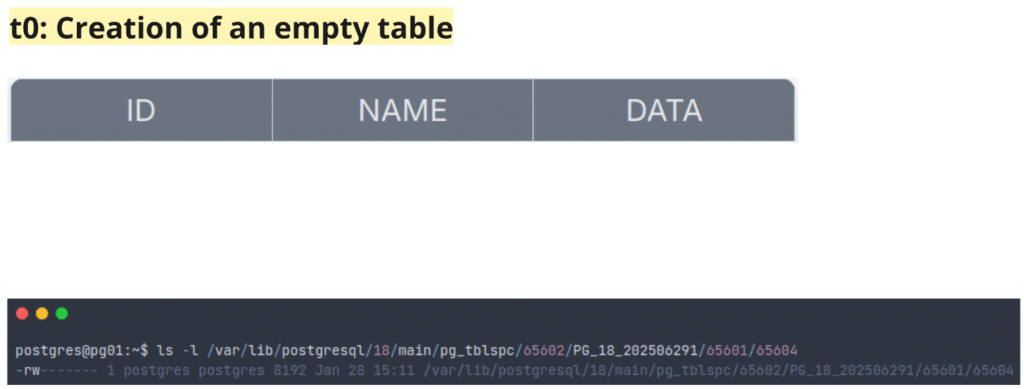
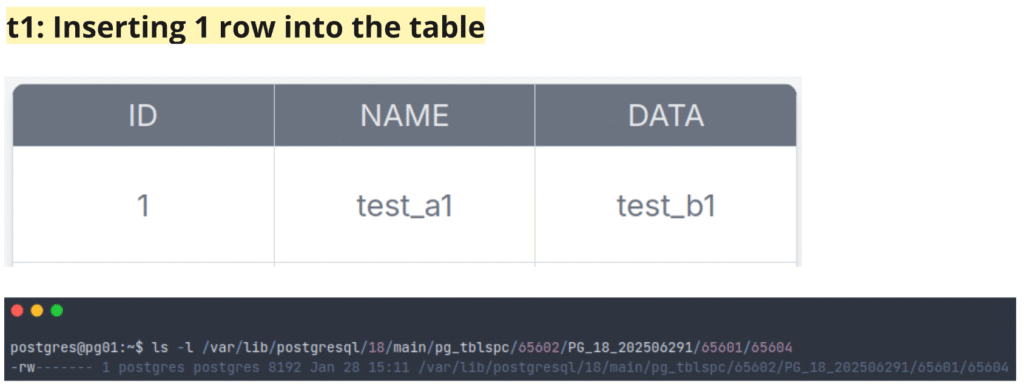
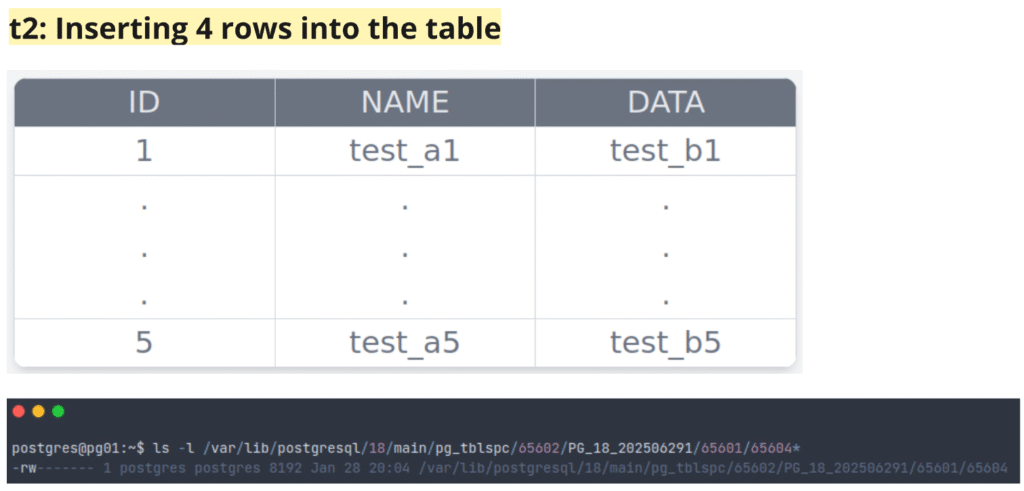
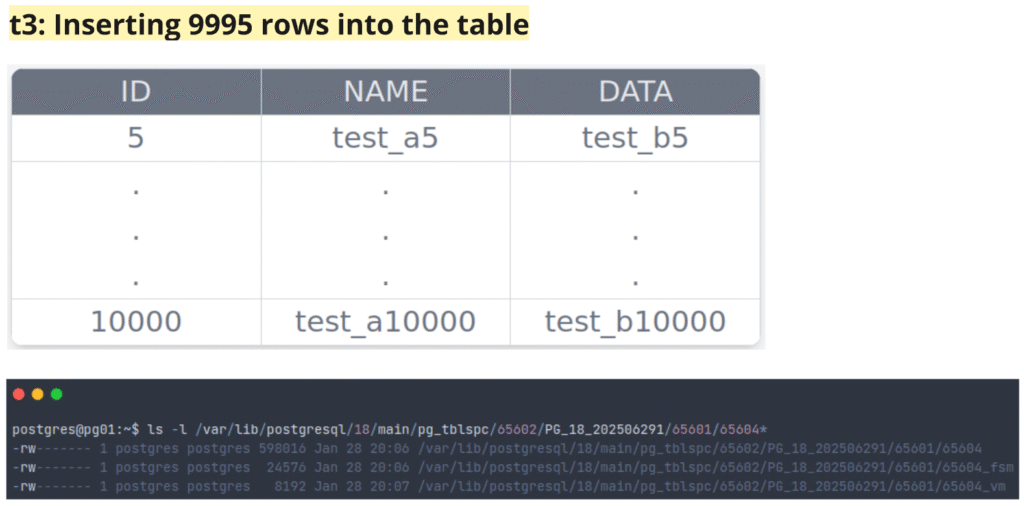
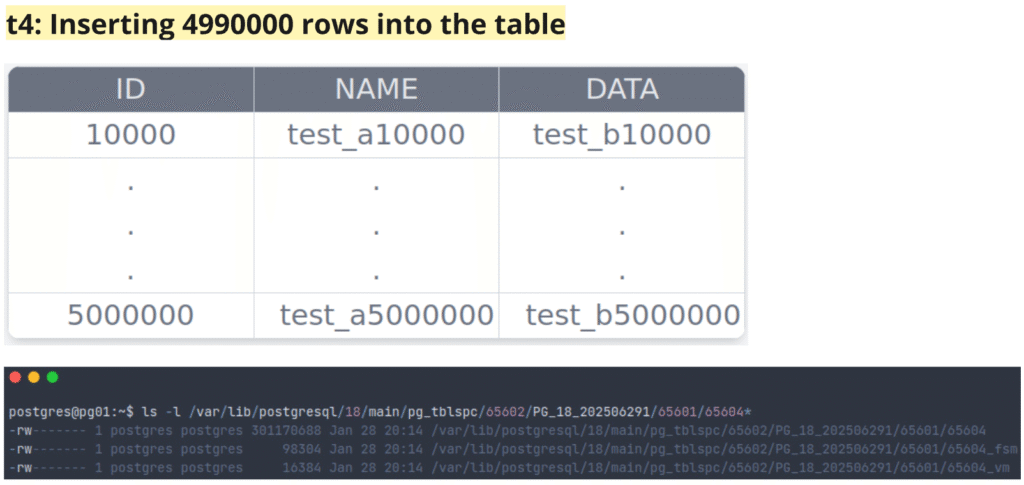
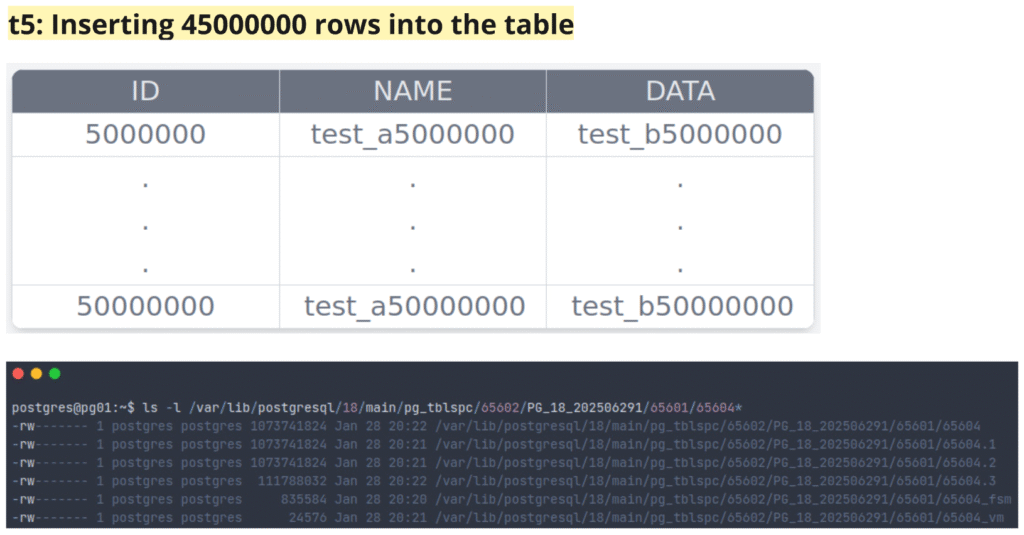
The code block below contains the commands used to perform these insert operations.
postgres@pg01:~$ psql -d db_test
psql (18.1 (Ubuntu 18.1-1.pgdg24.04+2))
Type "help" for help.

db_test=# begin;
BEGIN
db_test=*#
db_test=*# insert into schema_user_app_test_default.table_01 (id, name, data) values (2,'test_a2','test_b2');
INSERT 0 1
db_test=*#
db_test=*# commit;
COMMIT
db_test=#
db_test=# begin;
BEGIN
db_test=*#
db_test=*# insert into schema_user_app_test_default.table_01 (id, name, data) values (3,'test_a3','test_b4');
INSERT 0 1
db_test=*# insert into schema_user_app_test_default.table_01 (id, name, data) values (4,'test_a3','test_b4');
INSERT 0 1
db_test=*# insert into schema_user_app_test_default.table_01 (id, name, data) values (5,'test_a5','test_b5');
INSERT 0 1
db_test=*#
db_test=*# commit;
COMMIT
db_test=#
db_test=# checkpoint;
CHECKPOINT
db_test=#
db_test=# select * from page_header(get_raw_page('schema_user_app_test_default.table_01',0));
    lsn     | checksum | flags | lower | upper | special | pagesize | version | prune_xid
------------+----------+-------+-------+-------+---------+----------+---------+-----------
 5/23D39D10 |   -27597 |     0 |    44 |  7952 |    8192 |     8192 |       4 |         0
(1 row)

db_test=#
db_test=# select * from heap_page_items(get_raw_page('schema_user_app_test_default.table_01',0));
 lp | lp_off | lp_flags | lp_len | t_xmin | t_xmax | t_field3 | t_ctid | t_infomask2 | t_infomask | t_hoff | t_bits | t_oid |                   t_data
----+--------+----------+--------+--------+--------+----------+--------+-------------+------------+--------+--------+-------+--------------------------------------------
  1 |   8144 |        1 |     44 |    917 |      0 |        0 | (0,1)  |           3 |       2306 |     24 |        |       | \x0100000011746573745f613111746573745f6231
  2 |   8096 |        1 |     44 |    919 |      0 |        0 | (0,2)  |           3 |       2050 |     24 |        |       | \x0200000011746573745f613211746573745f6232
  3 |   8048 |        1 |     44 |    920 |      0 |        0 | (0,3)  |           3 |       2050 |     24 |        |       | \x0300000011746573745f613311746573745f6234
  4 |   8000 |        1 |     44 |    920 |      0 |        1 | (0,4)  |           3 |       2050 |     24 |        |       | \x0400000011746573745f613311746573745f6234
  5 |   7952 |        1 |     44 |    920 |      0 |        2 | (0,5)  |           3 |       2050 |     24 |        |       | \x0500000011746573745f613511746573745f6235
(5 rows)

db_test=#
db_test=# exit
postgres@pg01:~$
postgres@pg01:~$ ls -l /var/lib/postgresql/18/main/pg_tblspc/65602/PG_18_202506291/65601/
total 16
-rw------- 1 postgres postgres 8192 Jan 28 20:04 65604
-rw------- 1 postgres postgres    0 Jan 28 15:05 65607
-rw------- 1 postgres postgres 8192 Jan 28 15:05 65608
postgres@pg01:~$
postgres@pg01:~$ hexdump -C /var/lib/postgresql/18/main/pg_tblspc/65602/PG_18_202506291/65601/65604
00000000  05 00 00 00 10 9d d3 23  bc 93 00 00 2c 00 10 1f  |.......#....,...|
00000010  00 20 04 20 00 00 00 00  d0 9f 58 00 a0 9f 58 00  |. . ......X...X.|
00000020  70 9f 58 00 40 9f 58 00  10 9f 58 00 00 00 00 00  |p.X.@.X...X.....|
00000030  00 00 00 00 00 00 00 00  00 00 00 00 00 00 00 00  |................|
*
00001f10  98 03 00 00 00 00 00 00  02 00 00 00 00 00 00 00  |................|
00001f20  05 00 03 00 02 08 18 00  05 00 00 00 11 74 65 73  |.............tes|
00001f30  74 5f 61 35 11 74 65 73  74 5f 62 35 00 00 00 00  |t_a5.test_b5....|
00001f40  98 03 00 00 00 00 00 00  01 00 00 00 00 00 00 00  |................|
00001f50  04 00 03 00 02 08 18 00  04 00 00 00 11 74 65 73  |.............tes|
00001f60  74 5f 61 33 11 74 65 73  74 5f 62 34 00 00 00 00  |t_a3.test_b4....|
00001f70  98 03 00 00 00 00 00 00  00 00 00 00 00 00 00 00  |................|
00001f80  03 00 03 00 02 08 18 00  03 00 00 00 11 74 65 73  |.............tes|
00001f90  74 5f 61 33 11 74 65 73  74 5f 62 34 00 00 00 00  |t_a3.test_b4....|
00001fa0  97 03 00 00 00 00 00 00  00 00 00 00 00 00 00 00  |................|
00001fb0  02 00 03 00 02 08 18 00  02 00 00 00 11 74 65 73  |.............tes|
00001fc0  74 5f 61 32 11 74 65 73  74 5f 62 32 00 00 00 00  |t_a2.test_b2....|
00001fd0  95 03 00 00 00 00 00 00  00 00 00 00 00 00 00 00  |................|
00001fe0  01 00 03 00 02 09 18 00  01 00 00 00 11 74 65 73  |.............tes|
00001ff0  74 5f 61 31 11 74 65 73  74 5f 62 31 00 00 00 00  |t_a1.test_b1....|
00002000
postgres@pg01:~$
postgres@pg01:~$ psql -d db_test
psql (18.1 (Ubuntu 18.1-1.pgdg24.04+2))
Type "help" for help.

db_test=# create or replace function schema_user_app_test_default.insert_table_01(
    p_start_x integer,
    p_count   integer
)
returns void
language plpgsql
as $$
declare
    i integer;
    v_x integer := p_start_x;
begin
    for i in 1..p_count loop
        insert into schema_user_app_test_default.table_01 (id, name, data)
        values (
            v_x,
            'test_a' || v_x,
            'test_b' || v_x
        );

        v_x := v_x + 1;
    end loop;
end;
$$;
CREATE FUNCTION
db_test=#
db_test=# SELECT schema_user_app_test_default.insert_table_01(6, 9995);
 insert_table_01
-----------------

(1 row)

db_test=#
db_test=# checkpoint;
CHECKPOINT
db_test=#
db_test=# select count(*) from schema_user_app_test_default.table_01;
 count
-------
 10000
(1 row)

db_test=#
db_test=# select relname,
       pg_relation_size(relid) / current_setting('block_size')::int as block_count
from pg_catalog.pg_statio_user_tables
where relname = 'table_01';
 relname  | block_count
----------+-------------
 table_01 |          73
(1 row)

db_test=#
db_test=# select * from page_header(get_raw_page('schema_user_app_test_default.table_01',72));
    lsn     | checksum | flags | lower | upper | special | pagesize | version | prune_xid
------------+----------+-------+-------+-------+---------+----------+---------+-----------
 5/23EACEE8 |        0 |     0 |   324 |  3992 |    8192 |     8192 |       4 |         0
(1 row)

db_test=#
db_test=# select * from heap_page_items(get_raw_page('schema_user_app_test_default.table_01',72)) order by lp asc limit 5;
 lp | lp_off | lp_flags | lp_len | t_xmin | t_xmax | t_field3 | t_ctid | t_infomask2 | t_infomask | t_hoff | t_bits | t_oid |                         t_data
----+--------+----------+--------+--------+--------+----------+--------+-------------+------------+--------+--------+-------+--------------------------------------------------------
  1 |   8136 |        1 |     50 |    922 |      0 |     9920 | (72,1) |           3 |       2306 |     24 |        |       | \xc626000017746573745f613939323617746573745f6239393236
  2 |   8080 |        1 |     50 |    922 |      0 |     9921 | (72,2) |           3 |       2306 |     24 |        |       | \xc726000017746573745f613939323717746573745f6239393237
  3 |   8024 |        1 |     50 |    922 |      0 |     9922 | (72,3) |           3 |       2306 |     24 |        |       | \xc826000017746573745f613939323817746573745f6239393238
  4 |   7968 |        1 |     50 |    922 |      0 |     9923 | (72,4) |           3 |       2306 |     24 |        |       | \xc926000017746573745f613939323917746573745f6239393239
  5 |   7912 |        1 |     50 |    922 |      0 |     9924 | (72,5) |           3 |       2306 |     24 |        |       | \xca26000017746573745f613939333017746573745f6239393330
(5 rows)

db_test=#
db_test=# select * from heap_page_items(get_raw_page('schema_user_app_test_default.table_01',72)) order by lp desc limit 5;
 lp | lp_off | lp_flags | lp_len | t_xmin | t_xmax | t_field3 | t_ctid  | t_infomask2 | t_infomask | t_hoff | t_bits | t_oid |                           t_data
----+--------+----------+--------+--------+--------+----------+---------+-------------+------------+--------+--------+-------+------------------------------------------------------------
 75 |   3992 |        1 |     52 |    922 |      0 |     9994 | (72,75) |           3 |       2306 |     24 |        |       | \x1027000019746573745f61313030303019746573745f623130303030
 74 |   4048 |        1 |     50 |    922 |      0 |     9993 | (72,74) |           3 |       2306 |     24 |        |       | \x0f27000017746573745f613939393917746573745f6239393939
 73 |   4104 |        1 |     50 |    922 |      0 |     9992 | (72,73) |           3 |       2306 |     24 |        |       | \x0e27000017746573745f613939393817746573745f6239393938
 72 |   4160 |        1 |     50 |    922 |      0 |     9991 | (72,72) |           3 |       2306 |     24 |        |       | \x0d27000017746573745f613939393717746573745f6239393937
 71 |   4216 |        1 |     50 |    922 |      0 |     9990 | (72,71) |           3 |       2306 |     24 |        |       | \x0c27000017746573745f613939393617746573745f6239393936
(5 rows)

db_test=#
db_test=# exit
postgres@pg01:~$
postgres@pg01:~$ ls -l /var/lib/postgresql/18/main/pg_tblspc/65602/PG_18_202506291/65601/
total 624
-rw------- 1 postgres postgres 598016 Jan 28 20:06 65604
-rw------- 1 postgres postgres  24576 Jan 28 20:06 65604_fsm
-rw------- 1 postgres postgres   8192 Jan 28 20:07 65604_vm
-rw------- 1 postgres postgres      0 Jan 28 15:05 65607
-rw------- 1 postgres postgres   8192 Jan 28 15:05 65608
postgres@pg01:~$
postgres@pg01:~$ ls -l /var/lib/postgresql/18/main/pg_tblspc/65602/PG_18_202506291/65601/65604*
-rw------- 1 postgres postgres 598016 Jan 28 20:06 /var/lib/postgresql/18/main/pg_tblspc/65602/PG_18_202506291/65601/65604
-rw------- 1 postgres postgres  24576 Jan 28 20:06 /var/lib/postgresql/18/main/pg_tblspc/65602/PG_18_202506291/65601/65604_fsm
-rw------- 1 postgres postgres   8192 Jan 28 20:07 /var/lib/postgresql/18/main/pg_tblspc/65602/PG_18_202506291/65601/65604_vm
postgres@pg01:~$
postgres@pg01:~$ hexdump -C /var/lib/postgresql/18/main/pg_tblspc/65602/PG_18_202506291/65601/65604 | head
00000000  05 00 00 00 48 60 d4 23  34 f4 00 00 8c 02 90 02  |....H`.#4.......|
00000010  00 20 04 20 00 00 00 00  d0 9f 58 00 a0 9f 58 00  |. . ......X...X.|
00000020  70 9f 58 00 40 9f 58 00  10 9f 58 00 e0 9and 58 00  |p.X.@.X...X...X.|
00000030  b0 9and 58 00 80 9and 58 00  50 9and 58 00 20 9and 5c 00  |..X...X.P.X. .\.|
00000040  f0 9d 5c 00 c0 9d 5c 00  90 9d 5c 00 60 9d 5c 00  |..\...\...\.`.\.|
00000050  30 9d 5c 00 00 9d 5c 00  d0 9c 5c 00 a0 9c 5c 00  |0.\...\...\...\.|
00000060  70 9c 5c 00 40 9c 5c 00  10 9c 5c 00 e0 9b 5c 00  |p.\.@.\...\...\.|
00000070  b0 9b 5c 00 80 9b 5c 00  50 9b 5c 00 20 9b 5c 00  |..\...\.P.\. .\.|
00000080  f0 9a 5c 00 c0 9a 5c 00  90 9a 5c 00 60 9a 5c 00  |..\...\...\.`.\.|
00000090  30 9a 5c 00 00 9a 5c 00  d0 99 5c 00 a0 99 5c 00  |0.\...\...\...\.|
postgres@pg01:~$
postgres@pg01:~$ hexdump -C /var/lib/postgresql/18/main/pg_tblspc/65602/PG_18_202506291/65601/65604 | tail
00091f70  c8 26 00 00 17 74 65 73  74 5f 61 39 39 32 38 17  |.&...test_a9928.|
00091f80  74 65 73 74 5f 62 39 39  32 38 00 00 00 00 00 00  |test_b9928......|
00091f90  9a 03 00 00 00 00 00 00  c1 26 00 00 00 00 48 00  |.........&....H.|
00091fa0  02 00 03 00 02 08 18 00  c7 26 00 00 17 74 65 73  |.........&...tes|
00091fb0  74 5f 61 39 39 32 37 17  74 65 73 74 5f 62 39 39  |t_a9927.test_b99|
00091fc0  32 37 00 00 00 00 00 00  9a 03 00 00 00 00 00 00  |27..............|
00091fd0  c0 26 00 00 00 00 48 00  01 00 03 00 02 08 18 00  |.&....H.........|
00091fe0  c6 26 00 00 17 74 65 73  74 5f 61 39 39 32 36 17  |.&...test_a9926.|
00091ff0  74 65 73 74 5f 62 39 39  32 36 00 00 00 00 00 00  |test_b9926......|
00092000
postgres@pg01:~$
postgres@pg01:~$ hexdump -C /var/lib/postgresql/18/main/pg_tblspc/65602/PG_18_202506291/65601/65604_fsm
00000000  00 00 00 00 00 00 00 00  00 00 00 00 00 00 00 00  |................|
*
00004000  05 00 00 00 20 a6 d5 23  ef 7c 00 00 18 00 00 20  |.... ..#.|..... |
00004010  00 20 04 20 00 00 00 00  00 00 00 00 01 01 00 01  |. . ............|
00004020  00 00 00 01 00 00 00 00  00 00 00 01 00 00 00 00  |................|
00004030  00 00 00 00 00 00 00 00  00 00 00 01 00 00 00 00  |................|
00004040  00 00 00 00 00 00 00 00  00 00 00 00 00 00 00 00  |................|
00004050  00 00 00 00 00 00 00 00  00 00 00 01 00 00 00 00  |................|
00004060  00 00 00 00 00 00 00 00  00 00 00 00 00 00 00 00  |................|
*
00004090  00 00 00 00 00 00 00 00  00 00 00 01 00 00 00 00  |................|
000040a0  00 00 00 00 00 00 00 00  00 00 00 00 00 00 00 00  |................|
*
00004110  00 00 00 00 00 00 00 00  00 00 00 01 00 00 00 00  |................|
00004120  00 00 00 00 00 00 00 00  00 00 00 00 00 00 00 00  |................|
*
00004210  00 00 00 00 00 00 00 00  00 00 00 01 00 00 00 00  |................|
00004220  00 00 00 00 00 00 00 00  00 00 00 00 00 00 00 00  |................|
*
00004410  00 00 00 00 00 00 00 00  00 00 00 00 01 00 00 00  |................|
00004420  00 00 00 00 00 00 00 00  00 00 00 00 00 00 00 00  |................|
*
00004810  00 00 00 00 00 00 00 00  00 00 00 00 00 00 01 00  |................|
00004820  00 00 00 00 00 00 00 00  00 00 00 00 00 00 00 00  |................|
*
00005020  00 01 00 00 00 00 00 00  00 00 00 00 00 00 00 00  |................|
00005030  00 00 00 00 00 00 00 00  00 00 00 00 00 00 00 00  |................|
*
00006000
postgres@pg01:~$
postgres@pg01:~$ hexdump -C /var/lib/postgresql/18/main/pg_tblspc/65602/PG_18_202506291/65601/65604_vm
00000000  00 00 00 00 00 00 00 00  00 00 00 00 00 00 00 00  |................|
*
00002000
postgres@pg01:~$
postgres@pg01:~$ psql -d db_test
psql (18.1 (Ubuntu 18.1-1.pgdg24.04+2))
Type "help" for help.

db_test=# select schema_user_app_test_default.insert_table_01(10001, 4990000);
 insert_table_01
-----------------

(1 row)

db_test=#
db_test=# checkpoint;
CHECKPOINT
db_test=#
db_test=# select count(*) from schema_user_app_test_default.table_01;
  count
---------
 5000000
(1 row)

db_test=#
db_test=# select relname,
       pg_relation_size(relid) / current_setting('block_size')::int as block_count
from pg_catalog.pg_statio_user_tables
where relname = 'table_01';
 relname  | block_count
----------+-------------
 table_01 |       36764
(1 row)

db_test=#
db_test=# exit
postgres@pg01:~$
postgres@pg01:~$ ls -l /var/lib/postgresql/18/main/pg_tblspc/65602/PG_18_202506291/65601/65604*
-rw------- 1 postgres postgres 301170688 Jan 28 20:14 /var/lib/postgresql/18/main/pg_tblspc/65602/PG_18_202506291/65601/65604
-rw------- 1 postgres postgres     98304 Jan 28 20:14 /var/lib/postgresql/18/main/pg_tblspc/65602/PG_18_202506291/65601/65604_fsm
-rw------- 1 postgres postgres     16384 Jan 28 20:14 /var/lib/postgresql/18/main/pg_tblspc/65602/PG_18_202506291/65601/65604_vm
postgres@pg01:~$
postgres@pg01:~$ psql -d db_test
psql (18.1 (Ubuntu 18.1-1.pgdg24.04+2))
Type "help" for help.

db_test=# select schema_user_app_test_default.insert_table_01(5000001, 45000000);
 insert_table_01
-----------------

(1 row)

db_test=#
db_test=# checkpoint;
CHECKPOINT
db_test=#
db_test=# select count(*) from schema_user_app_test_default.table_01;
  count
----------
 50000000
(1 row)

db_test=#
db_test=# select relname,
       pg_relation_size(relid) / current_setting('block_size')::int as block_count
from pg_catalog.pg_statio_user_tables
where relname = 'table_01';
 relname  | block_count
----------+-------------
 table_01 |      406862
(1 row)

db_test=#
db_test=# exit
postgres@pg01:~$
postgres@pg01:~$ ls -l /var/lib/postgresql/18/main/pg_tblspc/65602/PG_18_202506291/65601/65604*
-rw------- 1 postgres postgres 1073741824 Jan 28 20:22 /var/lib/postgresql/18/main/pg_tblspc/65602/PG_18_202506291/65601/65604
-rw------- 1 postgres postgres 1073741824 Jan 28 20:21 /var/lib/postgresql/18/main/pg_tblspc/65602/PG_18_202506291/65601/65604.1
-rw------- 1 postgres postgres 1073741824 Jan 28 20:21 /var/lib/postgresql/18/main/pg_tblspc/65602/PG_18_202506291/65601/65604.2
-rw------- 1 postgres postgres  111788032 Jan 28 20:22 /var/lib/postgresql/18/main/pg_tblspc/65602/PG_18_202506291/65601/65604.3
-rw------- 1 postgres postgres     835584 Jan 28 20:20 /var/lib/postgresql/18/main/pg_tblspc/65602/PG_18_202506291/65601/65604_fsm
-rw------- 1 postgres postgres      24576 Jan 28 20:21 /var/lib/postgresql/18/main/pg_tblspc/65602/PG_18_202506291/65601/65604_vm
Deleting Some Rows/Data from the Table
To observe what happens to the table’s data and files on disk when rows are deleted, the following example was provided. After deleting rows from the table, its size remained unchanged and only decreased when a VACUUM FULL was executed (with the ANALYZE option performed alongside to collect table statistics). This behavior occurs because of PostgreSQL’s MVCC (Multi-Version Concurrency Control) model, which ensures data consistency. When a row is updated or deleted, its previous version remains stored, even if it is no longer needed. Under certain circumstances, this space can be reclaimed using VACUUM.
In the images below, after deleting some rows, the number of table blocks remained the same (406682) and only decreased (to 340686) after performing a VACUUM FULL. VACUUM FULL.
P.S.: Note that the table’s relfilenode changed, and the ctid of data rows also changes. Be careful when using patterns to retrieve data, as they may not always remain valid.
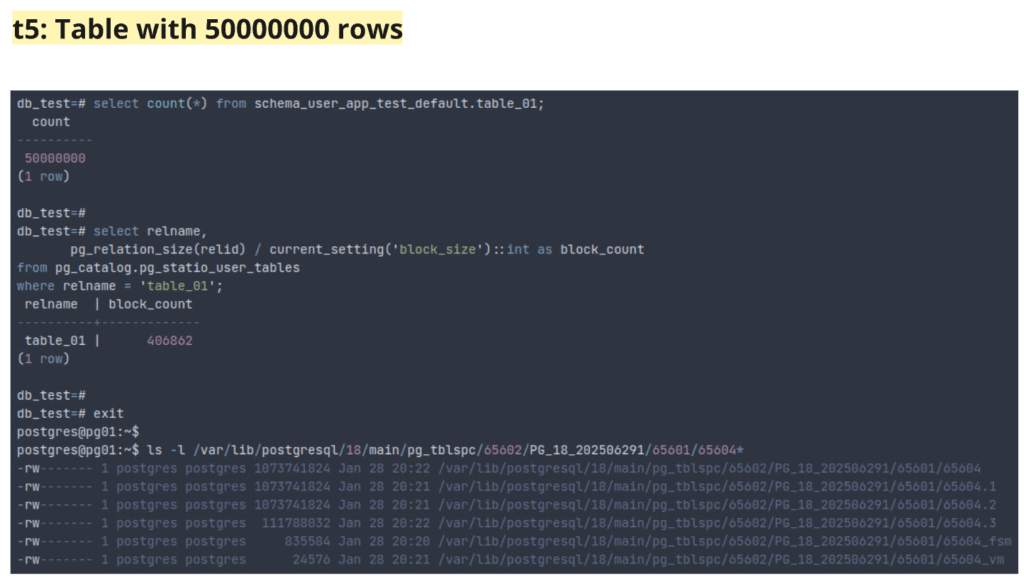
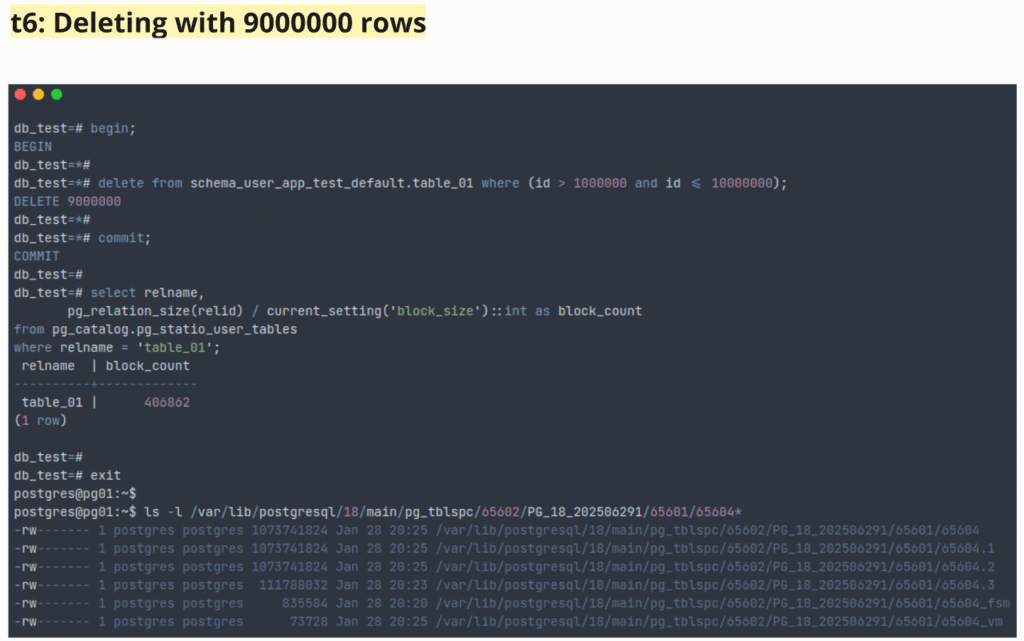
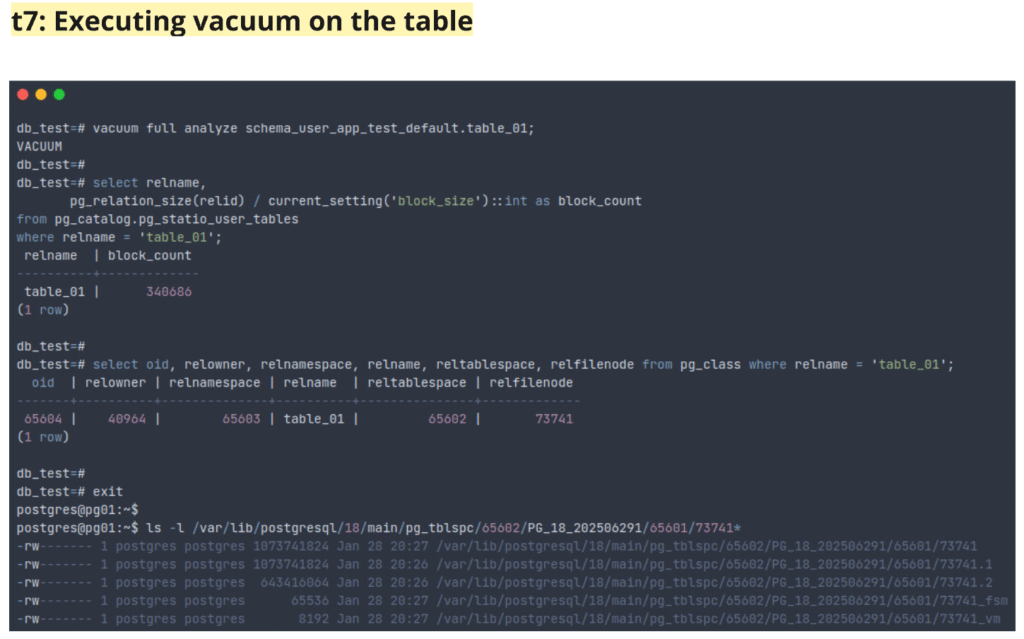
The code block below contains the commands for deleting rows and vacuuming the table. vacuum da tabela.
postgres@pg01:~$ psql -d db_test
psql (18.1 (Ubuntu 18.1-1.pgdg24.04+2))
Type "help" for help.

db_test=# begin;
BEGIN
db_test=*#
db_test=*# delete from schema_user_app_test_default.table_01 where (id > 1000000 and id <= 10000000);
DELETE 9000000
db_test=*#
db_test=*# commit;
COMMIT
db_test=#
db_test=# select relname,
       pg_relation_size(relid) / current_setting('block_size')::int as block_count
from pg_catalog.pg_statio_user_tables
where relname = 'table_01';
 relname  | block_count
----------+-------------
 table_01 |      406862
(1 row)

db_test=#
db_test=# exit
postgres@pg01:~$
postgres@pg01:~$ ls -l /var/lib/postgresql/18/main/pg_tblspc/65602/PG_18_202506291/65601/65604*
-rw------- 1 postgres postgres 1073741824 Jan 28 20:25 /var/lib/postgresql/18/main/pg_tblspc/65602/PG_18_202506291/65601/65604
-rw------- 1 postgres postgres 1073741824 Jan 28 20:25 /var/lib/postgresql/18/main/pg_tblspc/65602/PG_18_202506291/65601/65604.1
-rw------- 1 postgres postgres 1073741824 Jan 28 20:25 /var/lib/postgresql/18/main/pg_tblspc/65602/PG_18_202506291/65601/65604.2
-rw------- 1 postgres postgres  111788032 Jan 28 20:23 /var/lib/postgresql/18/main/pg_tblspc/65602/PG_18_202506291/65601/65604.3
-rw------- 1 postgres postgres     835584 Jan 28 20:20 /var/lib/postgresql/18/main/pg_tblspc/65602/PG_18_202506291/65601/65604_fsm
-rw------- 1 postgres postgres      73728 Jan 28 20:25 /var/lib/postgresql/18/main/pg_tblspc/65602/PG_18_202506291/65601/65604_vm
postgres@pg01:~$
postgres@pg01:~$ psql -d db_test
psql (18.1 (Ubuntu 18.1-1.pgdg24.04+2))
Type "help" for help.

db_test=# vacuum full analyze schema_user_app_test_default.table_01;
VACUUM
db_test=#
db_test=# select relname,
       pg_relation_size(relid) / current_setting('block_size')::int as block_count
from pg_catalog.pg_statio_user_tables
where relname = 'table_01';
 relname  | block_count
----------+-------------
 table_01 |      340686
(1 row)

db_test=#
db_test=# select oid, relowner, relnamespace, relname, reltablespace, relfilenode from pg_class where relname = 'table_01';
  oid  | relowner | relnamespace | relname  | reltablespace | relfilenode
-------+----------+--------------+----------+---------------+-------------
 65604 |    40964 |        65603 | table_01 |         65602 |       73741
(1 row)

db_test=#
db_test=# exit
postgres@pg01:~$
postgres@pg01:~$ ls -l /var/lib/postgresql/18/main/pg_tblspc/65602/PG_18_202506291/65601/73741*
-rw------- 1 postgres postgres 1073741824 Jan 28 20:27 /var/lib/postgresql/18/main/pg_tblspc/65602/PG_18_202506291/65601/73741
-rw------- 1 postgres postgres 1073741824 Jan 28 20:26 /var/lib/postgresql/18/main/pg_tblspc/65602/PG_18_202506291/65601/73741.1
-rw------- 1 postgres postgres  643416064 Jan 28 20:26 /var/lib/postgresql/18/main/pg_tblspc/65602/PG_18_202506291/65601/73741.2
-rw------- 1 postgres postgres      65536 Jan 28 20:27 /var/lib/postgresql/18/main/pg_tblspc/65602/PG_18_202506291/65601/73741_fsm
-rw------- 1 postgres postgres       8192 Jan 28 20:27 /var/lib/postgresql/18/main/pg_tblspc/65602/PG_18_202506291/65601/73741_vm
postgres@pg01:~$
postgres@pg01:~$ ls -l /var/lib/postgresql/18/main/pg_tblspc/65602/PG_18_202506291/65601/
total 2725596
-rw------- 1 postgres postgres          0 Jan 28 20:26 65604
-rw------- 1 postgres postgres          0 Jan 28 20:26 65607
-rw------- 1 postgres postgres          0 Jan 28 20:26 65608
-rw------- 1 postgres postgres 1073741824 Jan 28 20:27 73741
-rw------- 1 postgres postgres 1073741824 Jan 28 20:26 73741.1
-rw------- 1 postgres postgres  643416064 Jan 28 20:26 73741.2
-rw------- 1 postgres postgres      81920 Jan 28 20:27 73741_fsm
-rw------- 1 postgres postgres       8192 Jan 28 20:27 73741_vm
-rw------- 1 postgre
s postgres          0 Jan 28 20:26 73744
-rw------- 1 postgres postgres 8192 Jan 28 20:26 73745Table file layout
The table files are stored inside the tablespace specification, and the general possible files are the main file, the free space map, the visibility map, the initialization fork, and the TOAST table.
The image below shows the table from the previous examples, where it is possible to see the table main files (65604, 65604.1, 65604.2, and 65604.3), the free space map (65604_fsm), and the visibility map (65604_vsm).
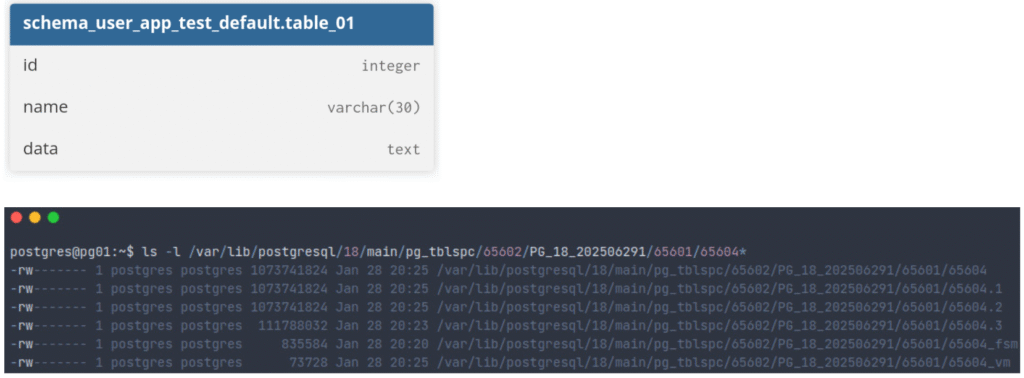
Table segments
The main file (or main fork) of ordinary relations is named based on the table pg_class.relfilenode. For temporary relations, they are named like tBBB_FFF, where BBB is the process number of the backend that created the file and FFF is the filenode number.
Table free space map (visualizing with pg_freespacemap extension)
Tables also have a free space map file, which stores information about free space and is named like pg_class.relfilenode followed by the suffix _fsmInstead of manually inspecting the file on disk, this can be done in the database by executing functions from the pg_freespacemap extension. The examples below show the free space map values for the table.
P.S.: The documentation indicates the following:

"The values stored in the free space map are not exact. They are rounded to a precision of 1/256th of BLCKSZ (32 bytes with the default BLCKSZ), and they are not kept fully up-to-date as tuples are inserted and updated."
postgres@pg01:~$ psql -d db_test
psql (18.1 (Ubuntu 18.1-1.pgdg24.04+2))
Type "help" for help.

db_test=# create extension if not exists pg_freespacemap;
CREATE EXTENSION
db_test=#
db_test=# select * from pg_freespace('schema_user_app_test_default.table_01') order by blkno asc limit 10;
 blkno | avail
-------+-------
     0 |     0
     1 |     0
     2 |     0
     3 |     0
     4 |     0
     5 |     0
     6 |    32
     7 |     0
     8 |     0
     9 |     0
(10 rows)

db_test=#
db_test=# select * from pg_freespace('schema_user_app_test_default.table_01') order by blkno desc limit 10;
 blkno  | avail
--------+-------
 406861 |     0
 406860 |     0
 406859 |     0
 406858 |     0
 406857 |     0
 406856 |     0
 406855 |     0
 406854 |     0
 406853 |     0
 406852 |     0
(10 rows)

db_test=#
db_test=# select * from pg_freespace('schema_user_app_test_default.table_01', 6);
 pg_freespace
--------------
           32
(1 row)Table visibility map (visualizing with pg_visibility extension)
Tables have a visibility map file to track which pages contain only tuples visible to all active transactions and which pages contain only frozen tuples. This file is named like pg_class.relfilenode followed by the suffix _vsm. Instead of manually inspecting the file on disk, this can be done in the database by executing functions from the pg_visibility extension.
postgres@pg01:~$ psql -d db_test
psql (18.1 (Ubuntu 18.1-1.pgdg24.04+2))
Type "help" for help.

db_test=# create extension if not exists pg_visibility;
CREATE EXTENSION
db_test=#
db_test=# select * from pg_visibility('schema_user_app_test_default.table_01') order by blkno asc limit 10;
 blkno | all_visible | all_frozen | pd_all_visible
-------+-------------+------------+----------------
     0 | t           | f          | t
     1 | t           | f          | t
     2 | t           | f          | t
     3 | t           | f          | t
     4 | t           | f          | t
     5 | t           | f          | t
     6 | t           | f          | t
     7 | t           | f          | t
     8 | t           | f          | t
     9 | t           | f          | t
(10 rows)

db_test=#
db_test=# select * from pg_visibility('schema_user_app_test_default.table_01') order by blkno desc limit 10;
 blkno  | all_visible | all_frozen | pd_all_visible
--------+-------------+------------+----------------
 406861 | f           | f          | f
 406860 | f           | f          | f
 406859 | f           | f          | f
 406858 | f           | f          | f
 406857 | f           | f          | f
 406856 | f           | f          | f
 406855 | f           | f          | f
 406854 | f           | f          | f
 406853 | f           | f          | f
 406852 | f           | f          | f
(10 rows)

db_test=#
db_test=# select * from pg_visibility('schema_user_app_test_default.table_01',406861);
 all_visible | all_frozen | pd_all_visible
-------------+------------+----------------
 f           | f          | f
(1 row)TOAST table
A table can also have an associated TOAST table if it has columns with potentially large entries. Data that does not fit in normal rows is stored in the TOAST table.
Initialization fork
If the table is of the unlogged type (which is not the case in the examples here), it will have another for file with the suffix _init.
Encrypted data (with pgcrypto extension)
PostgreSQL can have encryption at several levels. Here, the focus is on encryption for specific columns using the pgcrypto extension. The idea is to demonstrate a scenario where the file exists on disk but the data cannot initially be decrypted.
Compared with the previous scenarios, after encrypting column data with the extension, the data is written in encrypted form on the table file on disk, as shown in the images below.
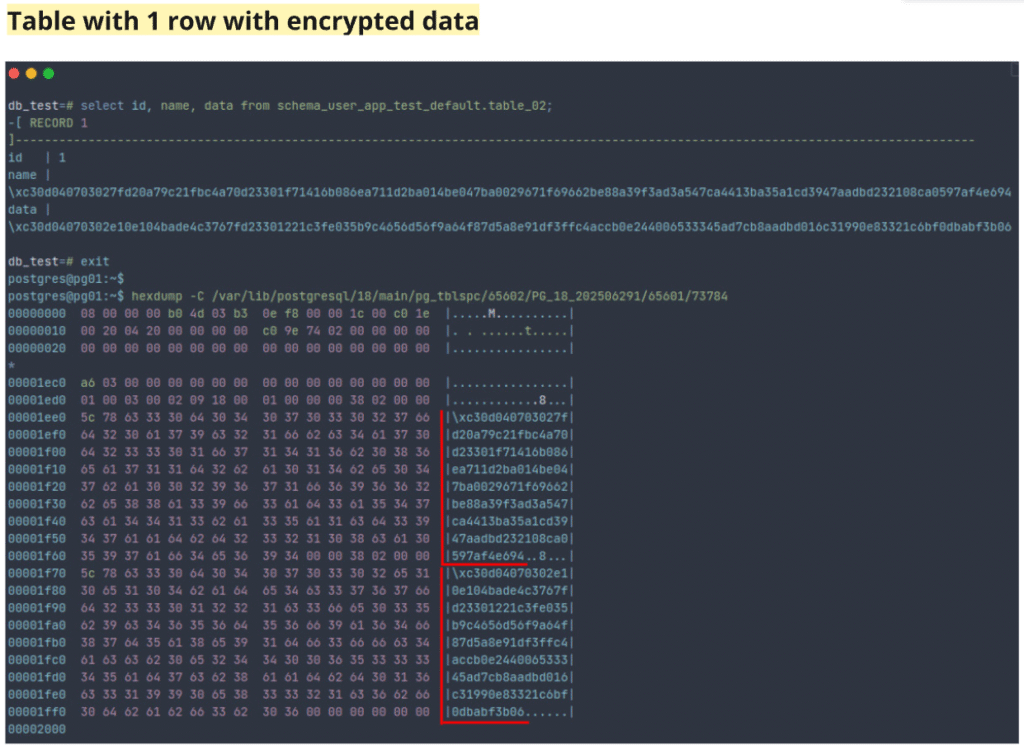
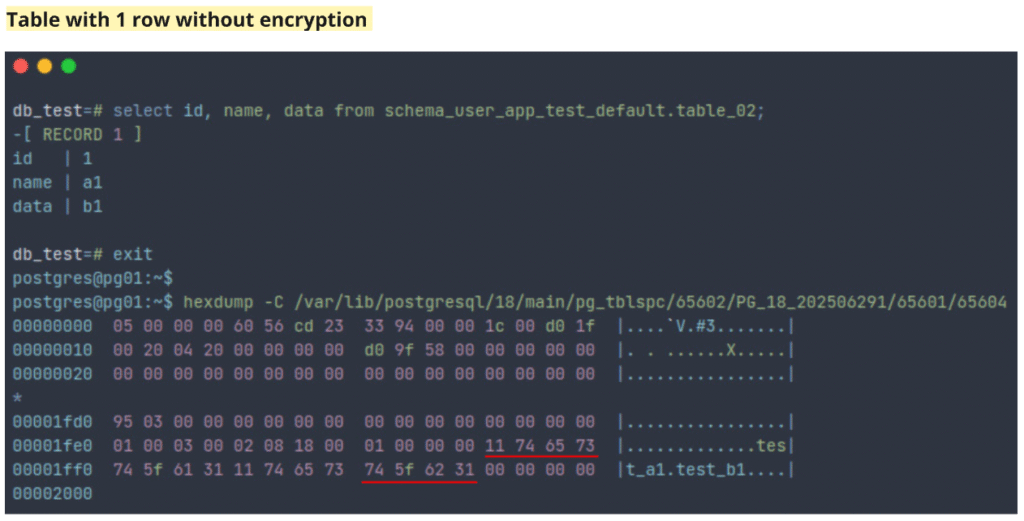
The code block below contains the commands to create encrypted data.
postgres@pg01:~$ psql -d db_test
psql (18.1 (Ubuntu 18.1-1.pgdg24.04+2))
Type "help" for help.

db_test=# create extension if not exists pgcrypto;
CREATE EXTENSION
db_test=#
db_test=# create table schema_user_app_test_default.table_02 (id integer,
                                                    name varchar(200),
                                                    data text) tablespace tbs_app_test_tbl;
CREATE TABLE
db_test=#
db_test=# begin;
BEGIN
db_test=*#
db_test=*# insert into schema_user_app_test_default.table_02 (id,name, data) values (1,pgp_sym_encrypt('a1', 'strong_password'), pgp_sym_encrypt('b1', 'strong_password'));
INSERT 0 1
db_test=*#
db_test=*# commit;
COMMIT
db_test=#
db_test=# checkpoint;
CHECKPOINT
db_test=#
db_test=# select id, name, data from schema_user_app_test_default.table_02;
db_test=#
db_test=# \x on
Expanded display is on.
db_test=#
db_test=# select id, name, data from schema_user_app_test_default.table_02;
-[ RECORD 1 ]------------------------------------------------------------------------------------------------------------------------------------
id   | 1
name | \xc30d040703027fd20a79c21fbc4a70d23301f71416b086ea711d2ba014be047ba0029671f69662be88a39f3ad3a547ca4413ba35a1cd3947aadbd232108ca0597af4e694
data | \xc30d04070302e10e104bade4c3767fd23301221c3fe035b9c4656d56f9a64f87d5a8e91df3ffc4accb0e244006533345ad7cb8aadbd016c31990e83321c6bf0dbabf3b06

db_test=#
db_test=# select id, pgp_sym_decrypt(name::bytea, 'strong_password') as name, pgp_sym_decrypt(data::bytea, 'strong_password') as data from schema_user_app_test_default.table_02 where id = 1;
-[ RECORD 1 ]
id   | 1
name | a1
data | b1

db_test=#
db_test=#
db_test=# \x off
Expanded display is off.
db_test=#
db_test=# select oid, relowner, relnamespace, relname, reltablespace, relfilenode from pg_class where relname = 'table_02';
  oid  | relowner | relnamespace | relname  | reltablespace | relfilenode
-------+----------+--------------+----------+---------------+-------------
 73784 |       10 |        65603 | table_02 |         65602 |       73784
(1 row)

db_test=#
db_test=# exit
postgres@pg01:~$
postgres@pg01:~$ ls -l /var/lib/postgresql/18/main/pg_tblspc/65602/PG_18_202506291/65601/73784*
-rw------- 1 postgres postgres 8192 Jan 28 20:31 /var/lib/postgresql/18/main/pg_tblspc/65602/PG_18_202506291/65601/73784
postgres@pg01:~$
postgres@pg01:~$ hexdump -C /var/lib/postgresql/18/main/pg_tblspc/65602/PG_18_202506291/65601/73784
00000000  08 00 00 00 b0 4d 03 b3  0e f8 00 00 1c 00 c0 1e  |.....M..........|
00000010  00 20 04 20 00 00 00 00  c0 9e 74 02 00 00 00 00  |. . ......t.....|
00000020  00 00 00 00 00 00 00 00  00 00 00 00 00 00 00 00  |................|
*
00001ec0  a6 03 00 00 00 00 00 00  00 00 00 00 00 00 00 00  |................|
00001ed0  01 00 03 00 02 09 18 00  01 00 00 00 38 02 00 00  |............8...|
00001ee0  5c 78 63 33 30 64 30 34  30 37 30 33 30 32 37 66  |\xc30d040703027f|
00001ef0  64 32 30 61 37 39 63 32  31 66 62 63 34 61 37 30  |d20a79c21fbc4a70|
00001f00  64 32 33 33 30 31 66 37  31 34 31 36 62 30 38 36  |d23301f71416b086|
00001f10  65 61 37 31 31 64 32 62  61 30 31 34 62 65 30 34  |ea711d2ba014be04|
00001f20  37 62 61 30 30 32 39 36  37 31 66 36 39 36 36 32  |7ba0029671f69662|
00001f30  62 65 38 38 61 33 39 66  33 61 64 33 61 35 34 37  |be88a39f3ad3a547|
00001f40  63 61 34 34 31 33 62 61  33 35 61 31 63 64 33 39  |ca4413ba35a1cd39|
00001f50  34 37 61 61 64 62 64 32  33 32 31 30 38 63 61 30  |47aadbd232108ca0|
00001f60  35 39 37 61 66 34 65 36  39 34 00 00 38 02 00 00  |597af4e694..8...|
00001f70  5c 78 63 33 30 64 30 34  30 37 30 33 30 32 65 31  |\xc30d04070302e1|
00001f80  30 65 31 30 34 62 61 64  65 34 63 33 37 36 37 66  |0e104bade4c3767f|
00001f90  64 32 33 33 30 31 32 32  31 63 33 66 65 30 33 35  |d23301221c3fe035|
00001fa0  62 39 63 34 36 35 36 64  35 36 66 39 61 36 34 66  |b9c4656d56f9a64f|
00001fb0  38 37 64 35 61 38 65 39  31 64 66 33 66 66 63 34  |87d5a8e91df3ffc4|
00001fc0  61 63 63 62 30 65 32 34  34 30 30 36 35 33 33 33  |accb0e2440065333|
00001fd0  34 35 61 64 37 63 62 38  61 61 64 62 64 30 31 36  |45ad7cb8aadbd016|
00001fe0  63 33 31 39 39 30 65 38  33 33 32 31 63 36 62 66  |c31990e83321c6bf|
00001ff0  30 64 62 61 62 66 33 62  30 36 00 00 00 00 00 00  |0dbabf3b06......|
00002000Considerations
Creating and using a table initially requires minimal effort and has little impact. As the table grows and system workload increases, usage can affect performance. Understanding how data is stored and where it is located, along with other database concepts, helps make better decisions from both architectural and functional perspectives.
References
- Extension pageinspect
- Extension pgcrypto
- Postgres architecture database file layout
- Postgres architecture database Page Layout
- Postgres code postgres/src/include/storage/bufpage.h
- Postgres code postgres/src/include/storage/itemid.h
- Postgres code postgres/src/include/access/htup_details.h
- Postgres code postgres/src/include/storage/itemptr.h
- Table system columns
- Storage free space map
- Module pg_freespacemap
- Storage visibility map
- Module pg_visibility
- Postgres vacuum
- Postgres block_size